How to Download Threads Videos Without Making It Complicated
Threads started as Instagram’s text-first answer to X, but it has quickly become more than a place for short posts and replies. People now share memes, reactions, tutorials, creator updates, news clips and behind-the-scenes videos there too.
So, naturally, you might see a video and think: I want to save that.
Maybe it is a recipe you want to try later. Maybe it is a funny clip you want to send to a friend. Maybe it is your own post and you want to reuse it somewhere else.
Whatever the reason, this guide explains how to download Threads videos, what to do when the app does not give you a direct save option and how to avoid the messy side of random downloader tools.
Can You Download Threads Videos Directly?
Threads does not always give you a simple download button. Depending on the post, your device and the app version you are using, you may only see options to share, copy the link or send the post to another app.
The usual workaround is simple:
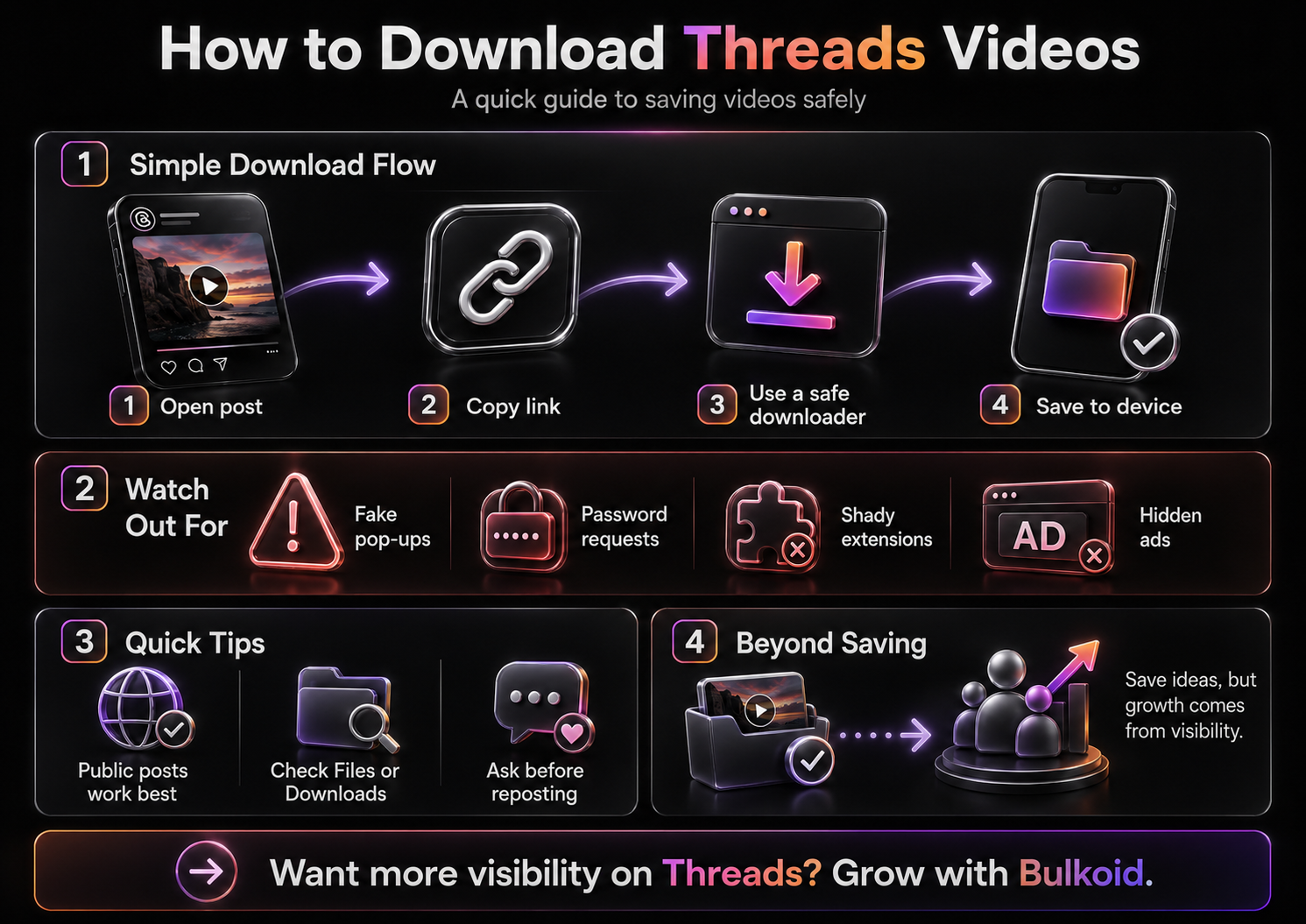
Open the Threads post → tap share → copy the link → use that link to save the video.
That works best with public posts. If the video comes from a private account, a deleted post or restricted content, most download tools will not be able to access it.
If you are still getting used to the app itself, this quick guide on what Threads is can help you understand how the platform works before you start saving and sharing content from it.
The Easiest Way to Download a Threads Video
The most common method is to use the post link. You do not need a complicated setup or a separate app in most cases.
-
Open Threads.
-
Find the video you want to save.
-
Tap the share icon under the post.
-
Choose Copy link.
-
Paste the link into a trusted Threads video downloader.
-
Download the video file to your phone or computer.
That is the basic process. If the downloader fails, do not keep jumping between random sites right away. First, open the copied link in your browser. If the post does not load there, the downloader probably cannot access it either.
Quick tip: A lot of failed downloads happen because the post is private, removed or no longer available. The tool is not always the problem.
How to Download Threads Videos on iPhone
On iPhone, the process is mostly the same, but Safari can make downloads feel a little hidden.
After you copy the Threads video link and paste it into a downloader, tap the download button and wait for the file to process. Once it finishes, Safari may save the video to your Files app instead of your Photos app.
If you cannot find it, check:
-
The Downloads folder in Files
-
The Recents section in Files
-
Your browser downloads
-
Your Photos app, if you manually saved it there
Some iPhone users expect every downloaded video to appear in the camera roll automatically. That does not always happen, so check Files first before assuming the download failed.
A Small Safety Note for iPhone Users
Be careful with sites that ask you to install a profile, allow strange permissions or download an extra app just to save one video. You usually do not need any of that.
A normal downloader should only need the Threads post link. If a site asks for your Instagram or Threads password, close it.
How to Download Threads Videos on Android
Android usually makes downloads a little easier to find. Copy the Threads video link, paste it into the downloader and save the file once it is ready.
You will usually find the video in:
-
Your Downloads folder
-
Your phone’s Gallery
-
Google Photos, depending on your settings
-
Your browser’s download history
If the file does not appear right away, open your file manager and check your recent downloads. Different browsers handle video files differently, so the video may not land exactly where you expect.
Can You Download Threads Videos Without a Third-Party Tool?

Sometimes, but not always in the way people mean.
You can save the post link, send it to yourself or add it to a notes app. That keeps the video easy to find later, but it does not save the actual video file to your device.
You can also screen record the video, but that should be a backup option. Screen recording usually gives you lower quality and it can capture notifications, buttons or extra movement on the screen.
Use screen recording only when:
-
You need the clip for personal reference
-
The video is short
-
A downloader does not work
-
You are not reposting it as if it belongs to you
If you plan to reuse the video publicly, get permission from the original creator first. Saving something for yourself is not the same as reposting someone else’s work.
Why Some Threads Videos Will Not Download
If a Threads video will not download, the issue is usually one of a few things.
The post may be private. The creator may have deleted it. The link may be broken. The downloader may not support Threads properly anymore. The video may also be part of a format that the tool cannot read.
Before you try anything else, copy the link again directly from Threads. Sometimes links get cut off when shared through messages or other apps.
You can also test the link in your browser. If it loads normally, the post is still public. If it does not load, a downloader probably will not work either.
Be Careful With Random Threads Video Downloaders

There are plenty of downloader sites online and not all of them feel trustworthy. Some work fine. Others bury the real download button under fake ads, pop-ups and confusing redirects.
A decent tool should be straightforward. You paste the link, it processes the video and gives you a download option. That is it.
Avoid downloaders that:
-
Ask for your Threads or Instagram password
-
Force you to install an unknown extension
-
Open several pop-ups before the download starts
-
Pretend your phone has a virus
-
Hide the real download button behind ads
-
Ask for payment before showing whether the link works
You do not need to log in to save a public video link. If a site asks for private account details, do not use it.
What About Downloading Your Own Threads Videos?
If the video is yours, check your camera roll, editing app or cloud storage before using a downloader. You may already have the original file saved somewhere.
Still, downloading your own Threads video can help if you posted it from another device or lost the edited version. In that case, copying the post link and using a downloader is a practical backup.
If you create content regularly, keep your videos organised. Save originals, edited versions and posted versions separately. It makes repurposing content easier later, especially if you are trying to build a stronger presence on Threads.
For creators, downloading old posts is only one part of the bigger picture. If you want to turn the platform into a real growth channel, this guide on how to grow on Threads covers the strategy side in more detail.
Should You Repost Downloaded Threads Videos?
This is where you need to slow down a little.
Downloading a video does not automatically mean you have the right to repost it. If the video belongs to another creator, ask for permission before using it on your own account, website or other social platforms.
A safer approach is to:
-
Share the original Threads post instead of reuploading it
-
Credit the creator clearly if they allow reposting
-
Use downloaded videos for personal reference only
-
Avoid editing someone’s content in a misleading way
Threads is becoming more of its own platform, not just an Instagram side feature. Fast Company covered how Threads’ newer branding helps separate it from Instagram, which makes creator credit and content ownership even more important as the platform grows.
Saving Videos Is Useful, But Growth Still Comes From Visibility

Downloading Threads videos can help you save ideas, reuse your own clips and build a small content library. But if you use Threads for a creator page, brand account or public profile, saving content is only one piece of the work. You still need people to actually see what you post.
That is where growth can get frustrating. Threads moves quickly and even strong posts can disappear if your account has little activity around it. Good content still matters most, but early visibility can help your profile look more active while you build that base.
For creators and businesses that want extra support, Bulkoid’s Threads growth services can fit naturally into a wider content plan. They should not replace useful posts, real replies or a clear voice on the platform. Think of them as a visibility boost that works best when your profile already gives people a reason to follow.
A smart setup looks like this:
-
Post original content regularly
-
Save useful Threads videos for ideas and inspiration
-
Repurpose your own clips across platforms
-
Reply to people instead of only posting and leaving
-
Use growth support carefully to help stronger posts get noticed
That balance matters. Downloading videos helps you collect and reuse content smarter. Growth services help more people find the account behind that content.
A Better Way to Save Threads Videos for Later
If you do not actually need the video file, saving the post link may be enough. This keeps the original creator attached to the content and avoids filling your phone with videos you may never use.
You can save Threads links in your notes app, bookmarks, a private chat with yourself, Google Docs or a simple content ideas spreadsheet.
This works especially well if you collect ideas for posts, memes, commentary or research. Instead of downloading everything, save only the videos you truly need as files.
Mashable has also looked at who is actually using Threads, and that is part of what makes saving content there interesting. The app has a mix of casual users, creators, brands, journalists and internet culture people, so good videos can move through conversations quickly.
Final Thoughts
Downloading Threads videos is not hard once you know the basic process. In most cases, you copy the post link, paste it into a reliable downloader and save the file to your device.
The important part is knowing when downloading makes sense. If you only want to revisit a post, save the link. If you want to keep your own video, download it or find the original file. If you want to reuse someone else’s video, ask first and give proper credit.
And if you are not just saving Threads videos, but trying to turn your account into something people actually notice, treat growth as part of the same system.
👉 Start building momentum with Bulkoid’s Threads growth services.
Save the clips that inspire you, post content worth following and give your profile the push it needs to reach more people.