How to Cancel Spotify Premium Without Losing Your Playlists
Spotify Premium is great when you use it every day. But if it has turned into one more subscription quietly charging your card, canceling it makes sense.
Maybe you barely open the app anymore. Maybe the price no longer feels worth it. Or maybe you just want to switch back to the free version for a while and see if you actually miss the paid features.
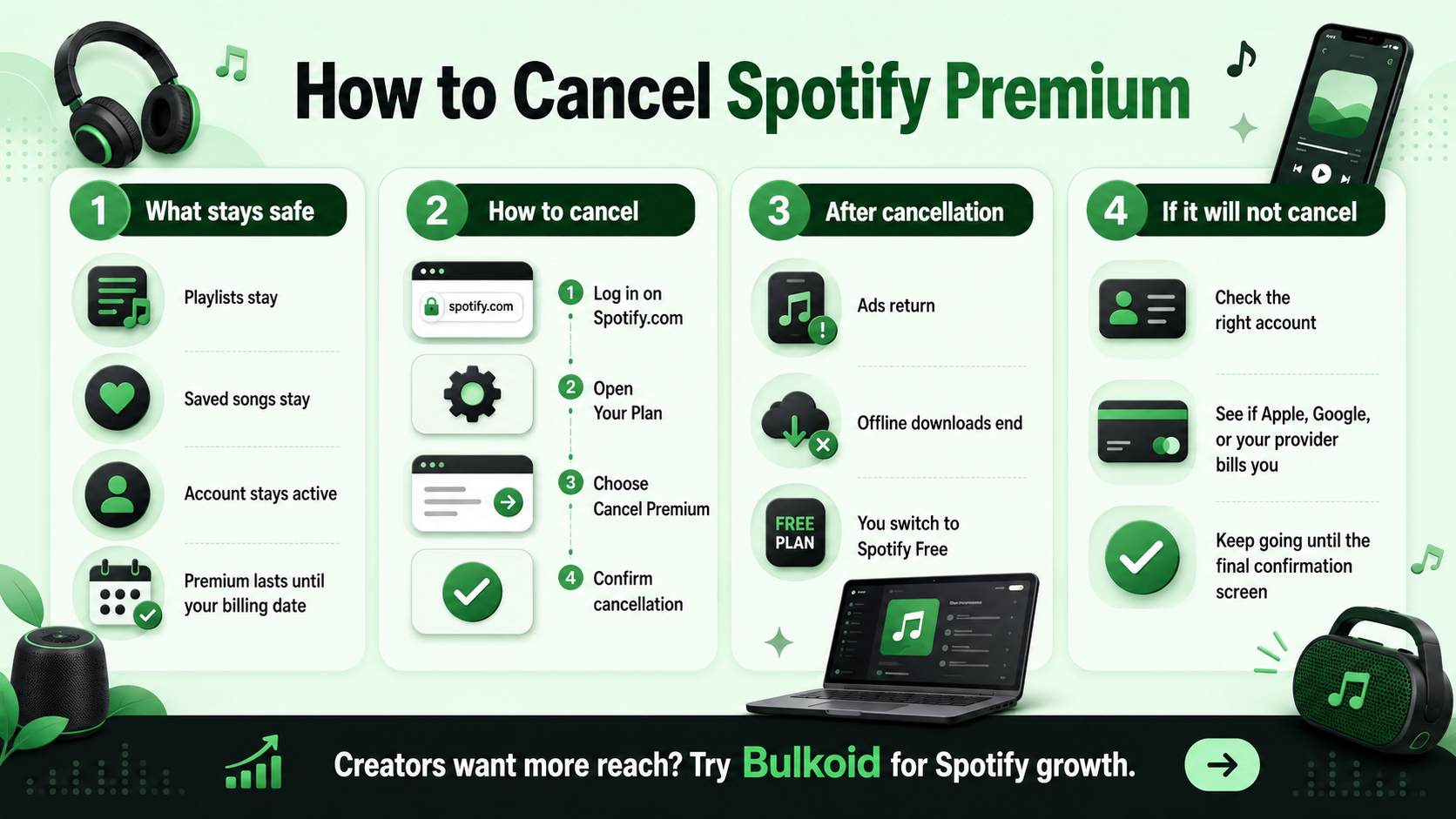
The good news is that canceling Spotify Premium does not delete your account, playlists or saved music. Your account stays active, and Premium usually continues until the end of your current billing period. After that, Spotify moves you back to the free plan.
How to Cancel Spotify Premium Step by Step
The easiest way to cancel Spotify Premium is through your account page. You can do it from your phone or computer, but it usually works best in a browser instead of the app.
Here’s what to do:
-
Go to Spotify’s website and log in.
-
Open your account page.
-
Find Your plan or Manage your plan.
-
Choose Change plan, Cancel subscription or Cancel Premium.
-
Follow the cancellation screens.
-
Stop only when Spotify confirms that your Premium plan has been canceled.
Spotify may show you plan options, offers or reminders before the final confirmation. Keep going until you see the actual cancellation message. Otherwise, you may leave the page too early and stay subscribed.
Can You Cancel Spotify Premium in the App?
You may be able to view plan details in the Spotify app, but cancellation often needs to happen through a browser. So if you cannot find the cancel button in the app, do not waste time tapping through every menu.
Open Spotify in Chrome, Safari or another browser, log in and cancel from your account page.
What Happens After You Cancel Spotify Premium?
Canceling Premium does not remove your Spotify account. You can still log in, play music and use your playlists. The main difference is that your account moves back to Spotify Free after your paid period ends.
|
Feature |
After canceling Premium |
|
Playlists |
You keep them |
|
Saved songs |
You keep them |
|
Account access |
Stays active |
|
Offline downloads |
Removed when Premium ends |
|
Ads |
Come back on the free plan |
|
Billing |
Stops after the current paid period |
So if your next billing date is two weeks away, you should still have Premium for those two weeks. After that, Spotify Free takes over.
Why You Might Want to Cancel Spotify Premium
You do not need a huge reason to cancel. Sometimes a subscription just stops earning its place.
Maybe you mostly listen to music somewhere else. Maybe you signed up during a free trial and forgot about it. Maybe you are cutting back on monthly payments. Or maybe you checked your listening habits and realized you are not using Premium enough to justify the cost.
Streaming prices have also become a bigger talking point. RouteNote reported on Spotify Premium price increases in Canada, which is exactly the kind of change that makes people rethink whether they still need the paid plan.
The real question is simple: are you using Premium enough to keep paying for it every month?
Check This Before You Cancel
Before you cancel, check who manages your subscription. This matters because Spotify may not always be the company billing you directly.
You may need to cancel through:
-
Apple App Store
-
Google Play
-
A mobile provider
-
An internet provider
-
A bundle partner
-
A Family or Duo plan manager
If the cancel button is missing from your Spotify account page, look at your payment method. The company charging you usually tells you where you need to cancel.
If You Subscribed Through Apple
Open Settings on your iPhone, tap your name, go to Subscriptions, choose Spotify and cancel it there.
If You Subscribed Through Google Play
Open the Google Play Store, tap your profile icon, go to Payments & subscriptions, then Subscriptions, choose Spotify and cancel.
This does the same basic thing as canceling through Spotify. It stops the paid renewal while keeping Premium active until the end of the current billing period.
Premium Features Are Changing Too
Before you cancel, it is worth taking one quick look at what Spotify Premium currently gives you. For some people, the usual benefits are enough: no ads, offline listening, better playback control and smoother listening across devices.
For others, Spotify’s newer features may matter more. In April 2026, Spotify announced fitness and workout content with Peloton, adding another reason some users may choose to keep Premium.
That does not mean you need to keep paying. It just means you should cancel for the right reason. If you do not use the extras, the free version may be enough.
If You Use Spotify as a Creator, Think Beyond Premium
For listeners, canceling Premium is mostly a billing decision. But if you are an artist, podcaster or creator, Spotify is also a discovery platform. In that case, your personal Premium plan matters less than how people find and interact with your content.
Canceling Premium will not remove your music from Spotify. Uploading tracks, managing releases and growing your profile are separate from your personal listening subscription. If you are still figuring out the creator side, this guide on how to upload a song to Spotify is a useful next step.
Once your music is live, growth becomes part of the bigger picture. You can build visibility through playlist pitching, social media clips, consistent releases and audience building outside Spotify. Some creators also use outside support when they want to give a new release or profile more early traction.
The key is to treat growth as a wider plan, not one single trick. Your music, branding, release schedule and connection with listeners still do the heavy lifting.
What to Do If Spotify Premium Will Not Cancel
If you cannot cancel, it usually comes down to one of three things.
You are logged into the wrong account.
This happens more often than people think, especially if you have used Apple, Google, Facebook or multiple email addresses to log in.
A third party manages your subscription.
If Apple, Google or a mobile provider handles your billing, Spotify may show your plan but not let you cancel it directly.
You did not reach the final confirmation screen.
Spotify may ask more than once before it actually cancels the plan. Keep going until you see clear confirmation.
A quick way to check is to look at your bank statement or app store subscriptions. Whoever charges you is usually where you need to cancel.
A Quick Note for Long-Time Spotify Users
Spotify has been around long enough that many people barely think about it as a subscription anymore. It just sits there in the background with the rest of their monthly payments.
That is why it helps to step back and look at how you actually use it now, not how you used it years ago. If you are curious about the platform’s early days, this breakdown of what year Spotify came out gives a simple look at how it became such a big part of music streaming.
Your habits may have changed since then. If Premium still fits, keep it. If it does not, canceling is a perfectly reasonable move.
Building Spotify Visibility After Canceling Premium
If you use Spotify as a creator, canceling Premium does not mean you stop caring about Spotify. It only means you are no longer paying for the listener version of the platform.
Your creator goals may still depend on how visible your tracks are, how active your profile looks and how much traction your releases can build over time. That is where promotion matters.
You can grow through organic content, playlist outreach, collaborations and consistent release planning. Some creators also use Bulkoid’s Spotify growth services as part of a wider push when they want to support their tracks with more visibility.
Used properly, that kind of support should sit alongside the real work: better music, stronger branding, regular promotion and a reason for listeners to come back.
Final Thoughts
Canceling Spotify Premium is simple once you know where to look. Log in through a browser, open your account page, cancel your plan and make sure you reach the confirmation screen.
You will not lose your playlists, saved songs or account. You will simply move back to Spotify Free after your paid period ends.
And if you use Spotify as a creator, do not stop at the subscription settings. Premium controls how you listen, but visibility controls how people find you.
👉 Want to keep building momentum after canceling Premium?
Use Bulkoid’s Spotify growth services to support your tracks, reach more listeners and give your Spotify presence a stronger push.