What Does Repost Mean on TikTok? How Reposting Works
On TikTok, “repost” means sharing someone else’s video with your own followers using the yellow two-arrow repost button. The video can then appear in your followers’ For You feeds with a “Reposted” label, and it’s collected in the Reposts tab on your profile (the two-arrow icon under your bio) rather than in your main video grid. Credit always stays with the original creator.
In this guide, we explore what reposting does, how to repost and undo a repost, and how it can help your account.
What Does Repost Mean on TikTok?

The simplest meaning of “repost” on TikTok is recommending someone else’s video to your followers. The feature is very similar to a retweet (repost) on X (Twitter).
You don’t have to be a content creator to repost on TikTok since the process is quite similar to sharing the video to external applications, as when you want to send it to your friends on WhatsApp or Messenger.
The fastest way to repost on TikTok is to tap the yellow button with two arrows, as you can see above.
How can you tell whether someone has uploaded their original video or reposted one? Easy: a reposted video appears in the For You feed with a special “Reposted” label showing who shared it.
What Does Reposting Do on TikTok?
Many people appreciate and actively use the repost function because it’s the quickest way to share an engaging or funny video with followers and friends instead of sending it individually to every person.
When you repost a video, two things happen:
- TikTok may show it to people who follow you in their For You feeds, marked as a repost.
- It’s added to the Reposts tab on your profile (the two-arrow icon under your bio), where anyone visiting your profile can scroll through everything you’ve reposted.
Importantly, reposts stay out of your main video grid, so you can repost as many videos as you wish without mixing other creators’ content in with your own uploads.
What Does It Mean When Someone Reposts Your Video on TikTok?
When someone reposts your video on TikTok, it means they found your content worth recommending to their audience. Your video gets a chance to reach their followers’ For You feeds, which is extra distribution you didn’t have to do anything for.
If you’re worried about others not finding out about the original creator of the video, rest assured that your username stays attached to the repost. Anyone can tap through to discover your profile.
How to Repost on TikTok?
Reposting a TikTok video is straightforward and quick. With a few taps on your smartphone, the video in question can reach your followers’ For You feeds. Here is a step-by-step guide:
Step 1: Open TikTok
Locate the TikTok app on your smartphone and launch it.
Step 2: Find a TikTok Video to Repost
Explore the TikTok feed and find a video you would really like to share with your followers without having to add it to your own uploads.
Step 3: Tap the Share Button
When you find a TikTok video worth sharing, tap the Share button. You usually use this button to send the video to a friend directly or to an external application.
Step 4: Find the Repost Button on TikTok
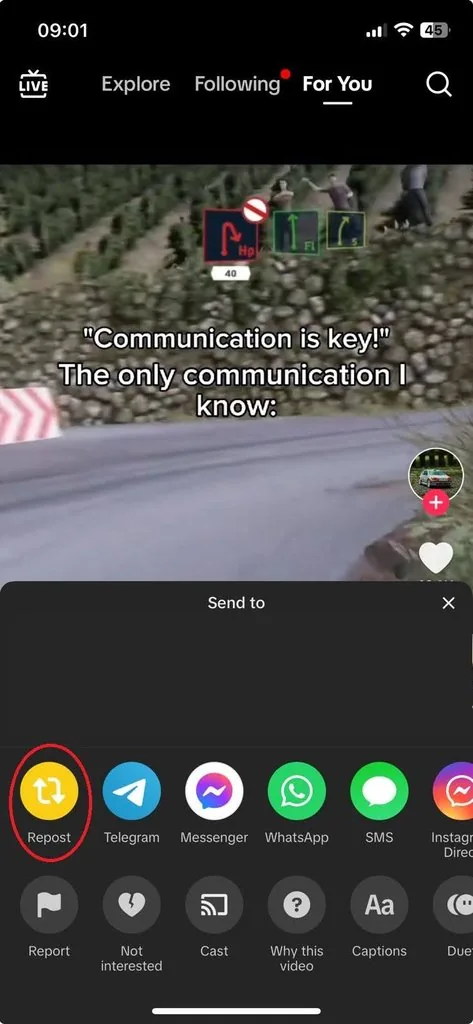
After tapping the Share button, you will be presented with multiple options. To repost the chosen video, locate the yellow button with two white arrows, as shown in the image above.
Note that the repost button only appears on other people’s public videos; TikTok doesn’t let you repost your own uploads.
How to Undo Reposting?
What happens if you repost a TikTok video totally by mistake? Fortunately, you have nothing to worry about. Removing a repost is easier than you might have thought.
To undo a repost, do the following:
- Open the video that you have just reposted.
- Tap the Share button, which is the same button you use to send the video to someone.
- Locate and tap “Remove repost.”
- The video is instantly removed from your reposts, and the recommendation disappears from your followers’ feeds.
What Are the Benefits of Reposting on TikTok?

Reposting on TikTok serves more than sharing interesting videos with your audience. Used with a bit of intention, it’s a low-effort way to stay active and visible between your own uploads.
So, how can reposting on TikTok be advantageous? Here is what you can achieve:
Stay Active Between Uploads
Reposting is a zero-production way to keep your account active on days you don’t publish anything new. Combined with a sensible posting schedule, it keeps your profile from going quiet without forcing you to rush out low-effort videos.
Become More Connected with Your Audience
Sharing videos that fit your niche tells your followers what you find funny, useful, or inspiring. Over time your Reposts tab becomes a curated feed that says something about you, and profile visitors do scroll it.
A New Way to Engage with Your Followers
Whenever there is a challenge or a conversation happening in your niche and you haven’t had time to create a new video, reposting a relevant one is an easy way to join in and start a conversation with your audience.
Foster New Connections
Reposting is also used in collaborations with other creators. By resharing their content, you support creators you like, and many will notice and return the favor, which can put your videos in front of their audience.
How to Repost Correctly?
Reposting only helps when it’s done with some intention. Here is what to keep in mind:
- Stay relevant: If you plan on reposting a video from another creator, check how well it suits your niche first. Random reposts dilute what your profile is about.
- Choose the right time: Timing matters; reposts reach more people during peak hours when your followers are actually scrolling.
- Don’t overdo it: A profile that only reposts gives the algorithm nothing original to work with. Treat reposts as seasoning between your own posts, not the main dish.
- Add a comment: Leaving a comment on the video you repost gives your followers context and often sparks replies.
Final Words
Reposting on TikTok is fast, easy, and has real benefits if you want to stay active, support creators in your niche, and keep your audience engaged between uploads. Not only will you enjoy the engagement, but you will also get a chance to attract new followers.
Since reposts show up both in your followers’ feeds and on your profile’s Reposts tab, a little curation goes a long way.
FAQ about Reposting on TikTok
How to remove reposts on TikTok?
Open the reposted video in the TikTok app, tap the Share button, and choose “Remove repost.” The video disappears from your Reposts tab and your followers’ feeds.
Where can I see my reposts on TikTok?
Go to your profile and tap the two-arrow repost icon under your bio. The Reposts tab lists every video you’ve reposted in reverse-chronological order.
Can I repost my own TikTok videos?
No. The repost button only appears on other people’s videos. If you want to give one of your own older videos another push, you can re-share it to other platforms, feature it in a new video, or use TikTok’s Promote tool.
Will reposting a video affect its engagement?
Reposting can help a video reach more people, since it recommends the video to your followers’ For You feeds. It works best when the video is relevant to your audience and you repost during peak engagement hours.