What Are Impressions on LinkedIn? (And What Counts as One)
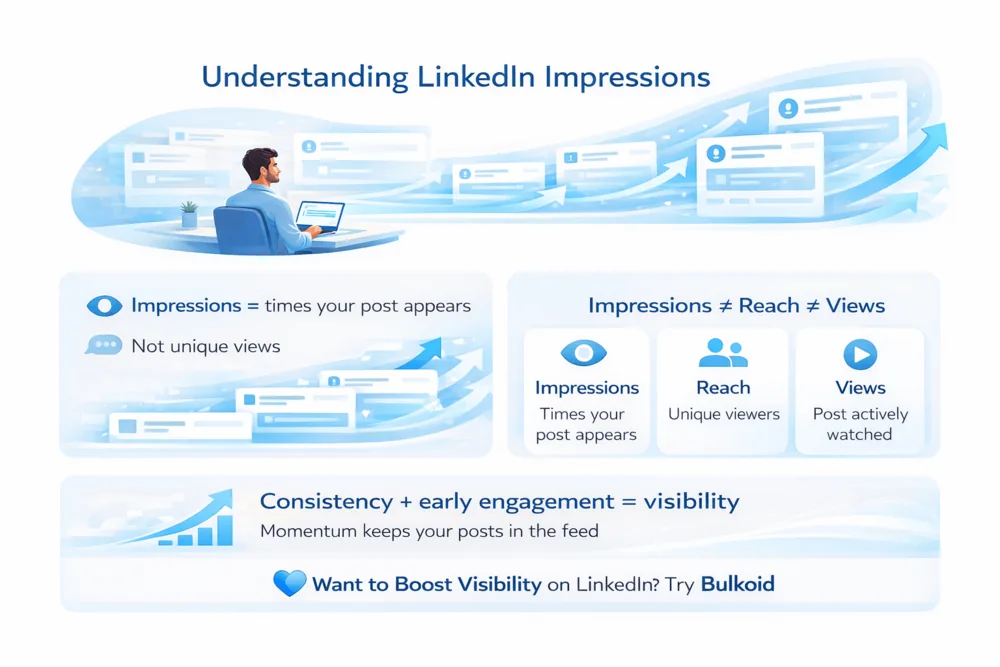
Impressions on LinkedIn are the number of times your post appears on someone's screen. LinkedIn counts one impression each time your post is at least 50% visible on a signed-in member's screen for at least 300 milliseconds.
That definition matters, because impressions are a visibility metric, not an engagement metric. Nobody has to click, like, comment, or even read your post for an impression to register. They just have to scroll past it slowly enough for it to count.
Impressions are also not unique. If the same person sees your post three times this week, that is three impressions. This is why impression counts always look high next to your likes and comments, and why comparing the two without context is misleading.
What Counts as an Impression on LinkedIn?
An impression is recorded whenever your content is served and actually rendered on screen for a signed-in member. In practice, impressions come from a few surfaces:
- The home feed, where most impressions happen
- Your profile's recent activity, when someone browses your posts directly
- Reshares of your post by other members
- Company page feeds, for posts published from a page
Just as useful is knowing what does not count. Views from logged-out visitors do not register, because the definition requires a signed-in member. A post that loads below the fold and is never scrolled into view does not count either, since it was never 50% visible. And appearing in someone's notifications is not an impression until the post itself is opened on screen.
Impressions vs Views vs Reach on LinkedIn
These three metrics get mixed up constantly because they all describe visibility. Each one answers a different question:
| Metric | What it measures | Unique? |
| Impressions | Each time your post is at least 50% on screen for 300 milliseconds or more | No, the same person can count many times |
| Reach (members reached) | How many individual members saw your post at least once | Yes, one per person |
| Views | Active consumption. For video, LinkedIn counts a view after at least 2 seconds of playback | No, but requires an action or playback |
Because one person can generate several impressions but only counts once toward reach, impressions will almost always be your biggest number, reach will be smaller, and engaged views smaller still. If your impressions are far higher than your reach, a smaller group of people is seeing your post repeatedly. If the two numbers are close, LinkedIn is spreading the post across mostly new screens.
What Is a Good Number of Impressions on LinkedIn?
LinkedIn does not publish impression benchmarks, and any absolute number you see quoted is a guess. The honest way to judge your impressions is against your own baseline:
Compare against your follower count. A common rule of thumb among LinkedIn creators is that a healthy post reaches roughly as many impressions as you have followers. Posts that resonate can go well beyond that, because LinkedIn shows strong posts to second-degree connections and non-followers.
Compare against your own median. Take your last ten posts and find the middle value. That median is your real benchmark. A post doing twice your median is a winner worth studying; a post at half your median underperformed for a reason worth finding.
Watch the trend, not the spikes. A single viral post matters less than whether your typical post earns more impressions this month than it did three months ago. Steady growth in your baseline means LinkedIn is distributing your content to more screens by default.
Context matters too. A niche post shown to 800 of exactly the right people can be worth more to you than 20,000 impressions from a generic engagement-bait post.
How to Check Your Impressions on LinkedIn

LinkedIn shows impression data in three places, depending on what you want to measure.
1. Post-level analytics
Every post you publish shows its impression count directly beneath it, visible only to you. Tap the count (or the small analytics icon) to open the full breakdown: impressions, members reached, and engagement over time. This is the fastest way to compare one post against another.
2. Profile analytics
Open your profile and look for the analytics section (under "Analytics" or "Analytics & tools"). Post impressions are shown across a 7, 28, 90, or 365 day window, which is the view to use when judging your overall trend rather than a single post.
3. Company page analytics
If you manage a page, the page's analytics tab tracks impressions across all updates. Page posts are distributed differently from personal posts, which is worth understanding if you publish in both places. Our guide on making a LinkedIn page for a company covers how page content gets surfaced.
How to Get More Impressions on LinkedIn
Impressions respond to a handful of inputs that you control:
Post consistently. Accounts that post on a regular schedule build a more stable impression baseline than accounts that post in bursts.
Win the first hour. LinkedIn shows a new post to a limited slice of your network first. If that early group engages, distribution widens. If the post stalls, it fades. Strong openings and posts that invite replies earn that early activity naturally. Some creators also give important posts an early nudge with LinkedIn likes from Bulkoid so the post has visible momentum while organic engagement builds.
Write for the scroll. Short paragraphs, a strong first line, and a clear idea keep people on your post long enough to register impressions on reshares and revisits.
Grow the audience the feed starts from. Your follower and connection count is the seed audience every post is tested on, so a bigger network raises the ceiling on every future post. That is a slow compounding effect from posting, engaging with others, and building out your follower base.
Final Thoughts
Impressions are the broadest measure of how much space your content earns in the LinkedIn feed. One impression is counted every time your post is half-visible on a signed-in member's screen for 300 milliseconds, which makes it a measure of exposure, not approval.
Use impressions to judge distribution, reach to judge how many distinct people you touched, and engagement to judge whether the content landed. Read together, and always against your own baseline, they tell you exactly what LinkedIn is doing with your posts and what to fix next.