How to Know if Someone Blocked You on Instagram (7 Checks)
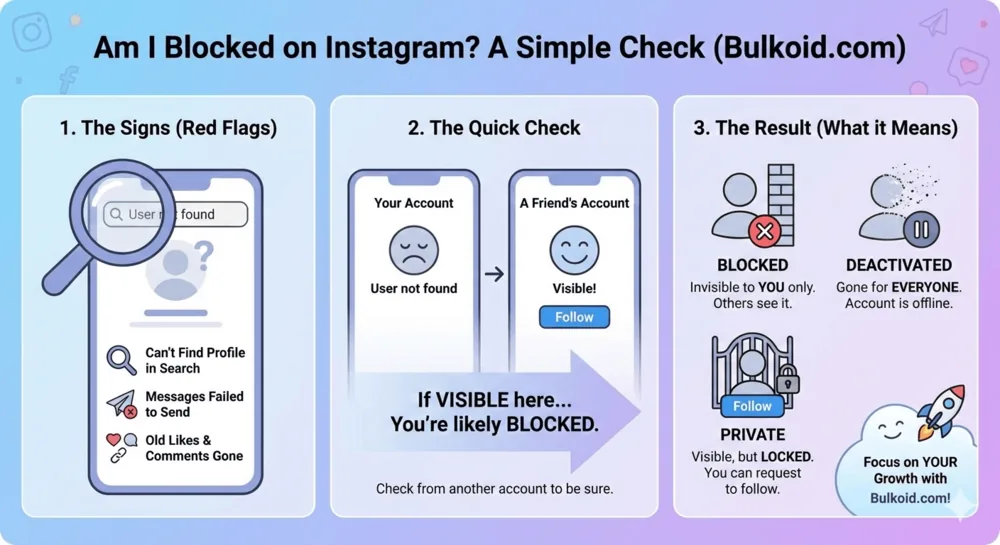
Instagram never notifies you when someone blocks you, but you can find out in about two minutes. The fastest route: search for their username, then open your old DM thread with them. If the profile is missing from search, their name in the chat shows as “Instagram User”, and new messages will not send, you have almost certainly been blocked. To be sure, confirm from another account.
No single sign is proof on its own, because a deactivated account or a username change can look identical at first. Run the seven checks below in order and you will have a reliable answer by the end.
The 7 Checks: How to Tell if Someone Blocked You on Instagram

1. Search for their username
Type their exact username into Instagram search. If you were blocked, the profile will not appear in your results at all, or you may see a “User not found” message. Search alone is not conclusive, though: the same thing happens when an account is deactivated or renamed.
2. Open your old DM thread
If you have messaged each other before, the conversation stays in your inbox. When you are blocked, their display name is usually replaced with “Instagram User”, the profile photo disappears, and anything new you type will not be delivered. This is one of the strongest single signals, but note that a deactivated account produces the same “Instagram User” label.
3. Visit their profile through an old comment, tag, or link
If you can still reach their profile page through an old comment, a tag, or a saved link, a block usually shows a page with no posts, or an error such as “User not found”. On its own this does not confirm a block, but it supports the other checks.
4. Look for their old likes and comments on your posts
Blocking removes the blocker’s past likes and comments from your posts. Open an old photo where you know they commented. If their comment is gone, or their name is there but nothing about it is clickable, that is a strong signal.
5. Try to tag or mention them
Start writing a comment or caption and type @ followed by their username. If the account no longer autocompletes and mentions do not turn into a link, Instagram is hiding that account from you.
6. Check while logged out
Open instagram.com/their-username in a browser where you are not logged in. If the account is public and the page loads normally there but is invisible inside your app, the account clearly exists and is hidden from you specifically. That points straight at a block.
7. Confirm from another account
This is the decisive check. Search for the username from a friend’s account or a second account of your own:
- If the profile appears there but not on your main account, you were blocked
- If the profile appears nowhere, the account was deactivated, renamed, or removed
Once this check lines up with two or three of the earlier ones, you have your answer.
Blocked vs Deactivated vs Restricted: How to Tell the Difference
These three states get mixed up constantly because they all make someone feel more distant. Here is how they actually compare:
| What you see | Blocked | Deactivated | Restricted |
| Profile in your search | Missing (only for you) | Missing for everyone | Visible as normal |
| Their posts and stories | Hidden from you | Hidden from everyone | Visible as normal |
| Old DM thread | “Instagram User”, messages will not deliver | “Instagram User” until they return | Your DMs land in their message requests, no read receipts |
| Their old likes and comments on your posts | Removed | Hidden while deactivated | Unchanged |
| Can other accounts see them? | Yes | No | Yes |
Restrict is the subtle one: it is aimed at limiting you quietly. Your comments on their posts become visible only to you unless they approve them, and your messages sit in their requests folder. Nothing about their profile changes from your side, which is exactly the point.
A private account is a fourth, harmless case: the profile still appears in search with its bio and photo, and you can request to follow. If you can see the profile shell but not the posts, you are not blocked.
Signs That Do Not Mean You’re Blocked

Plenty of ordinary changes get misread as blocks:
They stopped viewing your stories. They may have muted you, gone quiet, or simply missed them. If this is your main clue, read our guide on how to know if someone muted you on Instagram, because muting explains vanishing engagement far more often than blocking does.
They unfollowed you. Unfollowing removes your posts from their feed, but their profile stays visible and searchable to you.
Their likes on your content dropped. Instagram does not show every post to every follower. Reach moves around, and quieter engagement is usually the algorithm, not a decision about you.
They disappeared for a while. People take breaks or switch to a second account without deactivating anything.
Instagram keeps most viewing activity private by design. It never reveals profile visitors, and it will not tell you if someone screenshots your story either, so absence of visible activity rarely means what it seems to.
According to Instagram’s own help page on blocking, blocked people are never notified, which is why all of these checks are indirect in the first place.
FAQ
Will the person know if I check whether they blocked me?
No. Searching for their username, opening your old DM thread, or viewing their profile while logged out does not send any notification. Instagram also never shows anyone who viewed their profile.
What does “User not found” mean on Instagram?
It means the account is unavailable to you. That can happen because you were blocked, because the account was deactivated or removed by Instagram, or because the person changed their username. Checking from another account tells you which one it is.
If they unblock me, do their old likes and comments come back?
No. When someone blocks you, their past likes and comments are removed from your posts, and unblocking does not restore them.
Can someone who blocked me still see my profile?
Inside the app, no. Blocking hides both accounts from each other. If your account is public, they could still view your profile from a web browser while logged out, just like anyone else on the internet.
Final Thoughts
Instagram blocks are designed to be silent, but they are not designed to be undetectable. Search, your DM thread, old interactions, and one look from another account will settle it almost every time. If the account turns out to be deactivated or you were merely restricted, even better: nothing personal happened at all.
Either way, one missing profile is not worth much of your energy. Keep posting, keep engaging, and let your own account be the thing you check on daily.