How to reset Instagram Explore page is something many users look up once their feed starts showing content that no longer matches their interests. This shift usually happens gradually, often triggered by small interactions that add up over time.
The good news is that you don’t need to start a new account. The Explore page on Instagram responds quickly to recent behavior, which means it can be corrected with a few intentional changes. Understanding how those signals work is the first step toward fixing your feed.
How the Instagram Explore Page Works
The Explore page is not random. It’s built to predict what you might want to see next based on how you use the app. Every tap, pause, and interaction sends a signal to Instagram about your interests.
Instagram pays close attention to recent behavior, not just long-term habits. That means what you’ve liked, watched, or searched for lately carries more weight than things you engaged with months ago. Even short interactions can influence what appears on your Explore page.
If you want a deeper breakdown of the signals involved, how Instagram decides what content you see explains how engagement, relevance, and timing work together to shape recommendations across the app.
Some of the strongest signals include:
- Posts you like, save, or comment on
- Videos you watch all the way through
- Accounts you visit or follow
- Topics and keywords you search for
- How long you pause on certain posts
Instagram doesn’t judge intent. It can’t tell whether you enjoyed a post or clicked out of curiosity. It only sees engagement. If you spend time on a type of content, the algorithm assumes you want more of it.
This is why Explore pages can drift over time, especially if your habits change without you noticing. Once you understand that behavior drives recommendations, the idea of resetting your Explore page starts to make a lot more sense.
Next, it’s important to clear up whether a full reset is actually possible, or if the process works a bit differently than people expect.
Can You Fully Reset the Instagram Explore Page?

Short answer: not with a single tap.
Instagram doesn’t have a button that instantly clears your Explore recommendations. There’s no setting that wipes the feed clean in one move.
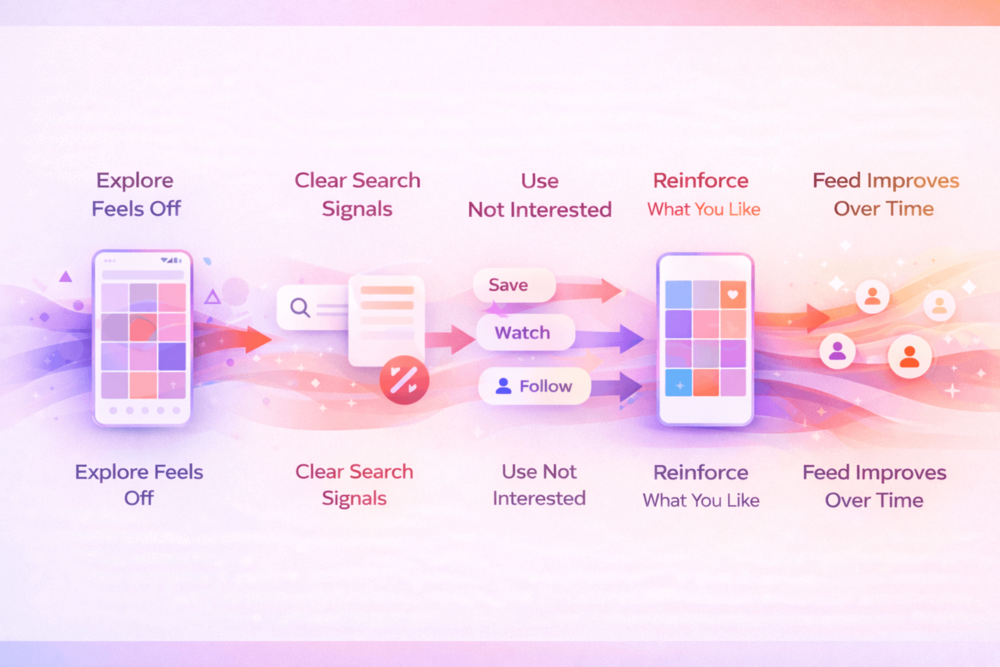
What most people mean by “resetting” Explore is actually this:
- Removing old signals Instagram has learned
- Stopping unwanted content from being reinforced
- Teaching the algorithm what you want to see now
Instead of deleting its memory, you’re updating it.
What Instagram Actually Responds To
The Explore page is heavily influenced by recent behavior. That’s why change is possible without extreme steps like starting a new account or unfollowing everyone.
Instagram pays the most attention to:
- What you engage with lately
- What you ignore or skip
- What you actively tell it you’re not interested in
If those signals change, your Explore page follows.
What This Means for You
You don’t need to rush or overhaul everything at once. Small, consistent actions make a bigger difference than one dramatic reset attempt. Once you stop feeding the algorithm the wrong signals and start reinforcing better ones, the feed begins to shift.
The easiest place to start removing those old signals is your search activity, which plays a bigger role than many people realize.
Clear Your Instagram Search History
Your search activity is one of the strongest signals shaping your Explore page. Every name, topic, or keyword you type tells Instagram what you might be interested in, even if you searched out of curiosity.
That’s why clearing your search history can create noticeable changes fast. It removes a cluster of signals that often keep unwanted content circulating.
How to Clear Your Search History
- Open Instagram and go to your profile
- Tap the menu in the top corner
- Select Your activity
- Open Recent searches
- Clear all search history
This won’t reset Explore on its own, but it removes one of the most direct ways Instagram learns your interests.
Why This Step Matters So Much
Instagram tracks more than just what you search. It also watches how long you spend on content related to those searches and how often you return to similar topics later. That’s why a few searches can have a lasting effect on your recommendations.
If you want a deeper look at how viewing and search behavior feeds into recommendations, Instagram tracks what you watch and search for explains how this data influences what the app shows you next.
Clearing your searches works best when you follow it up with better interaction habits. Otherwise, the algorithm quickly rebuilds the same patterns.
Next, we’ll look at how your daily interactions can either fix your Explore page or quietly keep it stuck where it is.
Actively Shape Your Explore Feed With Your Interactions

Once your search history is cleared, your daily behavior becomes the main driver of what shows up on Explore. Instagram doesn’t understand intent or opinion. It only reads actions.
Reinforce the Content You Want to See
If you want your Explore page to improve, you need to actively signal what belongs there. The strongest positive signals include:
- Saving posts related to your real interests
- Watching videos all the way through
- Visiting profiles that post content you enjoy
- Following creators in topics you want more of
Even viewing a profile sends a signal. Many users worry about this, but who can actually see profile views on Instagram explains what’s visible and what isn’t.
Stop Feeding the Content You Don’t Want
At the same time, you need to cut off signals that confuse the algorithm. Common habits that work against you include:
- Hate-watching videos
- Opening posts out of curiosity
- Sending unwanted content to friends
- Pausing on posts you plan to skip
If something doesn’t belong on your Explore page, tap the menu on the post and choose Not Interested. Do this consistently, not just once.
This also applies to Stories and temporary content. Many people don’t realize how much activity is tracked there, which is why what Instagram does and doesn’t reveal about story activity can help clarify how passive behavior still affects recommendations.
How Instagram Interprets Your Actions
| What You Do | How Instagram Reads It |
| Watch a video fully | Strong interest in that topic |
| Save a post | High relevance |
| Visit a profile | Curiosity or intent |
| Pause on a post | Possible interest |
| Mark “Not Interested” | Clear negative signal |
Instagram doesn’t know whether you liked something or just lingered on it. It only sees engagement.
Once your interactions become more intentional, your Explore page starts responding more predictably. That’s when changes begin to stick instead of resetting themselves.
Next, let’s talk about how long those changes usually take and what progress actually looks like.
How Long It Takes for Instagram Explore to Change
Once you start changing how you interact, the Explore page doesn’t update instantly. Instagram needs time to collect enough new signals before it adjusts what it shows you.
For most users, early changes appear within a few days. You might notice fewer irrelevant posts or a small shift toward topics you actually engage with. Bigger improvements usually take one to two weeks of consistent behavior.
What Progress Usually Looks Like
Instead of a sudden reset, changes tend to happen in stages:
- Unwanted content appears less often
- New topics start mixing into Explore
- Recommendations feel more accurate over time
This gradual shift is normal. It’s a sign the algorithm is testing new content to see how you respond.
Why Consistency Matters More Than Speed
One or two good sessions won’t fix Explore permanently. If old habits creep back in, the feed can slide right back with them. Consistent actions like saving relevant posts, skipping unwanted ones, and using Not Interested when needed are what lock changes in.
Think of Explore as something you guide, not something you fix once. When your behavior stays aligned, the recommendations stay aligned too.
As your Explore page improves, many users start thinking beyond cleanup and focus on how to guide their visibility and growth more intentionally. That’s where the next part comes in.
Supporting Healthier Instagram Growth

Fixing your Explore page is about sending clearer signals. Growth works the same way. When Instagram sees consistent engagement on your content, it has more confidence showing it to the right audience.
Early interaction plays a big role here. Posts that receive likes, views, and saves soon after publishing are more likely to be tested beyond your existing followers. This doesn’t guarantee viral reach, but it helps your content enter the recommendation cycle instead of stalling early.
A healthier growth approach usually focuses on a few core principles:
- Encouraging engagement soon after posting
- Reinforcing relevance through saves and watch time
- Avoiding sudden or unnatural activity spikes
- Supporting content so it reaches users aligned with your niche
Some creators choose to support these signals with tools built around visibility rather than shortcuts. Bulkoid is often used to strengthen early engagement patterns so posts have a better chance of reaching the right audience naturally.
If you’re curious how this kind of support fits into a broader growth strategy, reliable platforms that help improve Instagram post visibility breaks down what to look for and how to use them responsibly.
Whether you rely fully on organic interaction or add light support, the principle stays the same. Instagram responds to patterns. When those patterns are intentional and consistent, growth becomes easier to guide instead of guess.
Final Thoughts
Resetting your Instagram Explore page is about guiding the algorithm, not fighting it. Small actions like what you watch, what you skip, and what you engage with quietly shape the recommendations you see every day.
Once you stop reinforcing content that doesn’t match your interests and consistently interact with posts you actually care about, your Explore feed starts to feel relevant again. The changes may be gradual, but they tend to stick when your habits stay aligned.
👉 Want Your Instagram Posts to Get More Likes Faster?
Cleaning up your Explore page is only one part of the equation. If you want your posts to feel active, visible, and worth engaging with right after publishing, early likes can make a real difference.
Bulkoid helps creators buy Instagram likes in a controlled, natural way that supports visibility and stronger engagement signals, so your content has a better chance to perform instead of getting buried.