How to upload a song to Spotify is one of the first questions artists ask when they’re ready to release new music.
Whether this is your debut single or your tenth track, the process can feel confusing at first. Many artists assume they can upload directly to Spotify, but the platform actually works through digital distributors.
The good news is that once you understand the system, releasing music on Spotify is straightforward and repeatable.
In this guide, you’ll see the exact step-by-step process first, then everything you need to know about preparation, timing, costs, royalties, and promotion so your song goes live the right way.
Step-by-Step: How to Upload a Song to Spotify
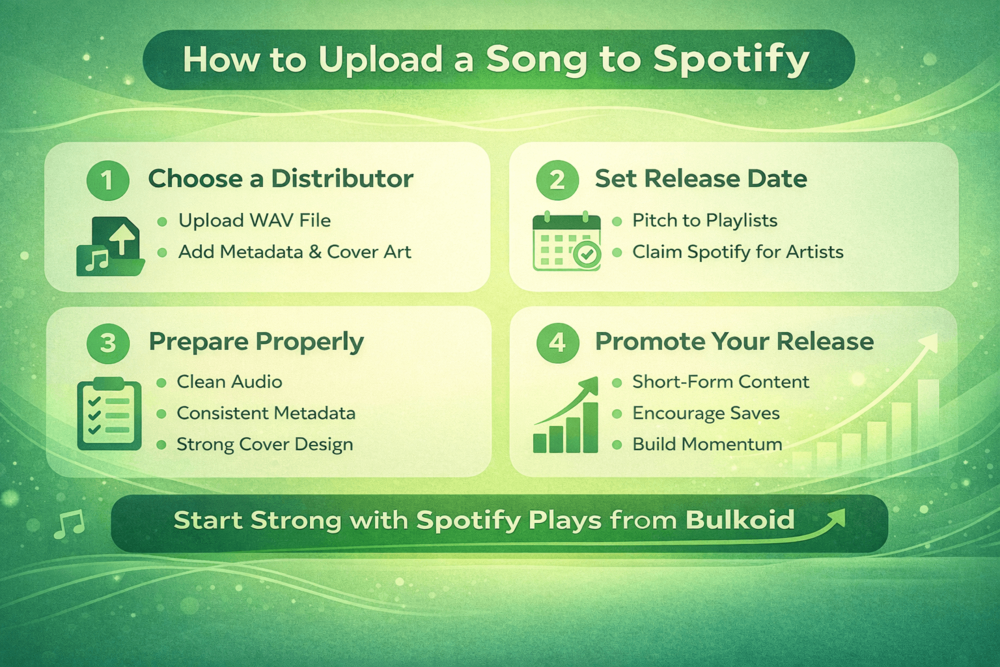
If you want the quick version of how to upload a song to Spotify, here’s the full process from start to finish.
1. Choose a Music Distributor
You cannot upload music directly to Spotify. You need a digital distributor like DistroKid, TuneCore, CD Baby, or Ditto. They deliver your song to Spotify and other streaming platforms and handle royalty payments.
2. Create Your Distributor Account
Sign up, enter your artist name exactly as you want it to appear, and fill in payment details. Double check spelling here. Small mistakes can cause big headaches later.
3. Upload Your Audio File
Most distributors require a high-quality WAV file. Make sure your track is properly mixed and mastered before uploading. Once it’s submitted, changing audio files can delay your release.
4. Add Song Details and Metadata
Enter your track title, artist name, featured artists, songwriter credits, and explicit content status. Consistency matters. Your artist name should match across all releases.
5. Upload Your Cover Art
Spotify requires square artwork. Keep it clean and readable, even at small sizes. Avoid blurry images or too much text.
6. Select Spotify and Other Platforms
Choose where you want your song distributed. Most artists select Spotify along with Apple Music, Amazon Music, and other major streaming services.
7. Set Your Release Date
Do not choose the earliest possible date unless you have to. Give yourself at least two to three weeks. This gives you time to pitch to playlists and plan your promotion strategy properly.
8. Submit for Review
After submission, your distributor sends the track to Spotify. Approval usually takes a few days, but delays can happen if artwork or metadata breaks guidelines.
9. Claim Spotify for Artists
Once your song is delivered, claim your Spotify for Artists profile. This gives you access to analytics, profile customization, and playlist pitching tools that directly influence how your music performs.
10. Pitch to Editorial Playlists
If you submit early enough, you can pitch your upcoming release directly inside Spotify for Artists.
Even if you are not selected, consistent releases and smart playlist pitching play a major role in growing your monthly listeners on Spotify, especially if your goal is steady audience growth instead of one short burst of streams.
Prepare Your Song and Set Up Your Artist Profile

Now that you understand the mechanics of how to upload a song to Spotify, the next step is making sure everything is properly prepared before you hit submit. Small mistakes in this stage can delay your release or create issues that are hard to fix later.
Audio Requirements
Most distributors require a high-quality WAV file. Avoid MP3 uploads unless explicitly allowed. Your track should be fully mixed and mastered before submission. Once it goes live, replacing audio can be complicated and may reset playlist momentum.
Make sure:
- The file has no clipping or distortion
- Silence at the beginning and end is clean
- The final master matches your intended loudness
Cover Art Guidelines
Spotify requires square artwork, usually at least 3000 x 3000 pixels. Keep it sharp and readable at small sizes since most listeners see it on mobile screens.
Avoid:
- Blurry images
- Excessive text
- Copyrighted logos you do not own
Simple, bold visuals often perform better than cluttered designs.
Metadata Matters More Than You Think
Your metadata includes:
- Artist name
- Track title
- Featured artists
- Songwriters and producers
- Explicit content flag
Be consistent with spelling and formatting across every release. If your artist name changes slightly from one upload to another, Spotify may create duplicate artist profiles.
ISRC and UPC Codes
Most distributors automatically generate ISRC codes for each track and a UPC code for the release. These codes identify your music across platforms and are essential for royalty tracking.
If you plan to re-release the same track later, keeping the same ISRC helps preserve stream counts.
Claim and Optimize Spotify for Artists
After your song is delivered, claim your Spotify for Artists profile. This is where you:
- Access streaming analytics
- Pitch songs to editorial playlists
- Edit your bio and images
- Highlight a release using Artist Pick
Spotify continues investing heavily in artist discovery tools and personalization, as seen in AI-powered playlist features and mood-based recommendations that shape how listeners find new music.
Your profile is not just a page. It is part of your brand. Add a professional bio, strong photos, and links to your social platforms. A polished profile increases trust when new listeners land on your page.
Streaming platforms have fundamentally reshaped the music industry, and recent reporting on Spotify’s influence in the music industry highlights just how central streaming now is for independent artists. That makes getting this setup right even more important.
How Long It Takes and How Much It Costs
Once your song is uploaded, the two biggest questions are timing and cost. Both are straightforward, but planning ahead makes a big difference.
How Long Does It Take to Upload a Song to Spotify?
After you submit your track through your distributor, it usually takes between two and seven days for Spotify to approve and schedule it. Some releases go live faster, but you should never rely on last-minute uploads.
If you want to pitch your track to Spotify’s editorial playlists, you need to submit it at least seven days before the release date inside Spotify for Artists. That means your distributor upload should happen even earlier.
Delays usually happen because of:
- Incorrect artwork size
- Metadata mismatches
- Duplicate ISRC codes
- Copyright flags
The safest move is to upload your song three to four weeks before your intended release date. That gives you breathing room and time to build anticipation.
How Much Does It Cost to Upload a Song to Spotify?
Spotify does not charge artists directly to upload music. You pay your distributor instead.
Distributors typically follow one of these models:
- Annual subscription fee with unlimited uploads
- One-time payment per release
- Free upload with a revenue split
Subscription services are often better if you release music frequently. One-time payment options may make sense if you only plan to release a few tracks per year.
Be careful with “free” distribution. Many free plans take a percentage of your royalties or limit certain features like faster release times or detailed analytics.
The real cost is not just the distributor fee. It is also how seriously you treat the release. If you rush it without planning, you may waste the opportunity.
Understanding timing and budgeting properly allows you to focus on the next important piece, which is how Spotify royalties actually work and when you get paid.
Promote Your Song After Upload

Getting your track live is only half the job. Promotion is what turns a release into real streams.
Plan Before Release Day
Start building anticipation before your song drops. Share short previews, behind-the-scenes clips, and remind your audience of the release date. Pre-saves can help boost early performance and signal interest from day one.
Use Short-Form Content to Drive Traffic
TikTok, Instagram Reels, and YouTube Shorts are powerful discovery channels. Post multiple pieces of content using your sound and focus on strong hooks in the first few seconds.
If your content does not reach people, it will not convert into streams. That is why many artists work on strengthening their social visibility during a release. Platforms like Bulkoid can support creators by increasing reach across social media, helping more people actually see and click through to new Spotify releases.
Encourage Saves and Offline Listening
Saves matter. When listeners save your track, they are more likely to replay it, which improves long-term performance.
You can also remind fans they can download your song inside the app. Understanding downloading songs on Spotify for offline listening helps you guide listeners toward habits that increase repeat plays.
Conclusion
Now you know exactly how to upload a song to Spotify and get it live the right way. The process is simple once you understand it, but real results come from smart planning and consistent promotion.
Do not let your track launch to silence.
👉 Start strong with Spotify plays from Bulkoid
Build instant momentum that attracts more listeners from day one. Give your release the push it deserves and turn attention into streams.