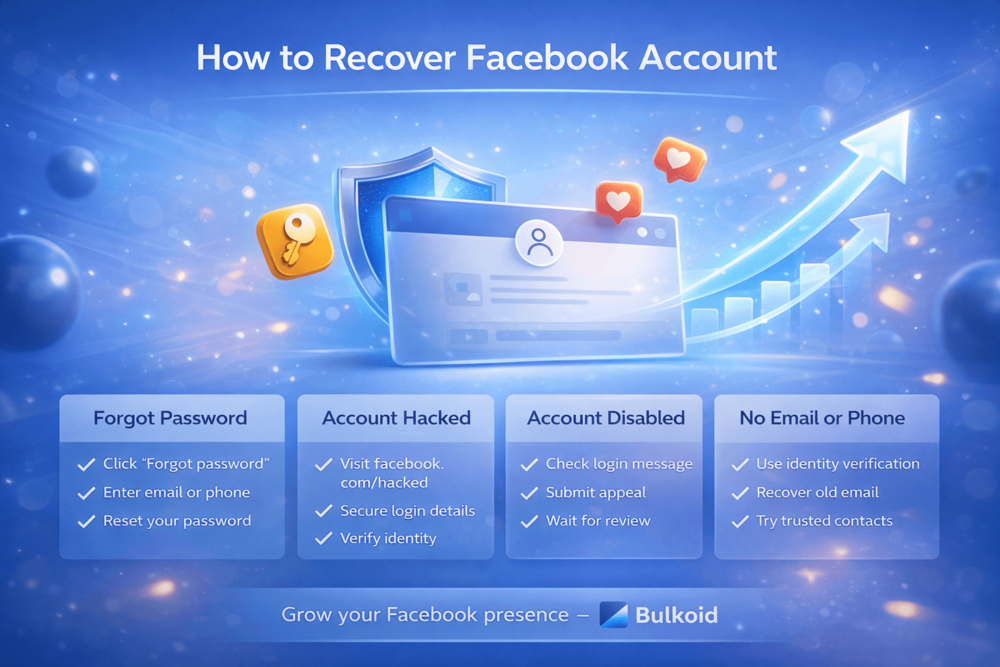
How to recover Facebook account access depends on what caused the lockout in the first place. You might have forgotten your password, lost access to your email or phone number, or noticed suspicious activity that suggests your account was hacked.
Getting locked out can feel frustrating, especially if your account holds years of photos, messages, and personal information. The good news is that in most cases, Facebook provides recovery options that can help you regain access.
In this guide, you’ll learn exactly how to recover Facebook account access step by step, whether your account is locked, hacked, disabled, or missing login details.
How to Recover Facebook Account If You Forgot Your Password
If you simply forgot your password, recovering your Facebook account is usually quick and straightforward.
Follow these steps:
1. Go to the Facebook Login Page
Open the Facebook app or visit the official login page in your browser.
2. Click “Forgot password?”
Below the password field, click the “Forgot password?” link.
3. Enter Your Email, Phone Number, or Username
Type the email address, mobile number, or username linked to your account. Then click search.
4. Choose a Recovery Method
Facebook will show available recovery options. You can receive a reset code by:
- SMS text message
Select the option you still have access to.
5. Enter the Verification Code
Check your email inbox or text messages for the code. Enter it on Facebook when prompted.
If you don’t see the email, check your spam or junk folder.
6. Create a New Password
Choose a strong password you haven’t used before. Avoid simple combinations or reused passwords from other sites.
Once updated, you should regain access immediately.
What If Facebook Doesn’t Send the Reset Code?
If you don’t receive the verification code:
- Double-check the email or phone number entered
- Wait a few minutes and request another code
- Make sure your email inbox isn’t full
- Check your spam folder
If none of these work, you may need to try the identity verification option or move to the next recovery method explained below.
How to Recover Facebook Account After It Was Hacked
If you suspect your account was hacked, act quickly. The faster you respond, the easier it is to limit damage.
Common signs your account was hacked:
- Your password suddenly doesn’t work
- Your email or phone number was changed
- You see posts or Facebook messages you didn’t send
- Friends report suspicious links from your account
If this happens, follow these steps.
1. Go to Facebook’s Hacked Account Page
Visit the official recovery page at facebook.com/hacked from Facebook.
Click “My account is compromised”.
2. Enter Your Login Details
Type your email, phone number, or username associated with the account. Even if the hacker changed your password, Facebook may still recognize your account.
3. Follow the Security Check
Facebook will guide you through:
- Resetting your password
- Reviewing recent activity
- Removing suspicious logins
- Securing your email and connected apps
If your email was changed, Facebook often allows you to reverse the change using a recovery link sent to your original email address. Check your inbox carefully.
4. Verify Your Identity
If standard recovery fails, Facebook may ask for identity verification. This can include:
- Uploading a government-issued ID
- Confirming previous passwords
- Identifying friends from tagged photos
Make sure the information matches your account exactly. Even small differences can delay approval.
What If the Hacker Changed Everything?
If the hacker changed your:
- Phone number
- Password
You can still attempt recovery through identity verification. Facebook may ask additional questions to confirm ownership.
Be patient. In hacked cases, recovery can take anywhere from a few hours to several days depending on verification requirements.
After You Regain Access
This part is critical.
Immediately:
- Change your password again
- Enable two-factor authentication
- Log out of all active sessions
- Check connected apps and remove anything suspicious
- Update your recovery email and phone number
A hacked account is often targeted again if security is not upgraded properly.
How to Recover Facebook Account If It Was Disabled
If your Facebook account was disabled, the recovery process is different from a simple password reset.
When Facebook disables an account, it usually happens because the system detected activity that may violate its Community Standards. Sometimes this is correct. Sometimes it’s a mistake.
Common reasons accounts get disabled:
- Posting content that violates guidelines
- Using a fake name
- Suspicious or automated activity
- Repeated policy violations
- Someone reporting your account
If you believe your account was disabled by mistake, you can submit an appeal.
Step 1: Check the Login Message
Try logging in normally. If your account is disabled, the platform will show a message explaining the Facebook restriction.
Some suspensions are temporary. Others require an appeal.
Step 2: Submit an Appeal
If Facebook provides an appeal option, click it and follow the instructions.
You may need to:
- Confirm your identity
- Upload a government-issued ID
- Explain why you believe the decision was incorrect
Keep your explanation short and factual. Avoid emotional language. Focus on clarity.
Step 3: Wait for Review
After submitting your appeal, Facebook reviews your case.
Timelines vary:
- Temporary review: 24–72 hours
- Manual review: Several days
- Complex cases: Up to a few weeks
You will usually receive a response via email.
Can a Permanently Disabled Account Be Recovered?
If Facebook determines that your account seriously violated policies, recovery may not be possible.
In some cases, accounts that remain disabled for more than 30 days are permanently removed.
That’s why submitting an appeal quickly is important.
Important Tips During the Appeal Process
- Do not create multiple new accounts
- Do not submit repeated appeals
- Make sure your name matches your ID
- Check your email regularly for updates
Submitting multiple requests can slow down the review process.
Recovering a disabled account can take patience, but if the suspension was a mistake, many users regain access after review.
How to Recover Facebook Account Without Email or Phone Number
If you no longer have access to the email address or phone number linked to your account, recovery becomes more complicated but not impossible.
The key is proving that you’re the real owner. Here’s what you can try:
1. Try to Identify Your Account
Go to the Facebook login page and click “Forgot password?”
Enter:
- Your full name
- Your username
- An old email address that may have been connected
If Facebook finds your profile, select it and continue.
Even if you cannot access the listed email or phone, this step confirms the account still exists.
2. Look for the “No Longer Have Access to These?” Option
During the recovery process, Facebook may show an option that says something similar to “No longer have access to these?”
If available, click it.
You may be asked to:
- Provide a new email address
- Complete additional verification
- Confirm identity details
3. Use Identity Verification
If standard recovery fails, Facebook may request identity confirmation.
This usually involves:
- Uploading a government-issued ID
- Confirming previous passwords
- Answering security questions
Make sure your ID matches the name on your account. If you used a nickname instead of your real name, this can delay approval.
4. Try Recovering Your Old Email First
Sometimes the easiest solution is restoring access to your old email account instead of Facebook.
If you can regain access to that inbox, you can then complete the Facebook password reset normally.
5. Check for Trusted Contacts
If you previously set up Trusted Contacts, Facebook may allow you to send recovery codes to selected friends.
They can provide you with the codes needed to regain access.
Not everyone has this enabled, but if you do, it can be very helpful.
Important Reality Check
If:
- You have no access to your email
- You have no access to your phone
- You cannot verify your identity
Recovery may not be possible.
Facebook must protect accounts from unauthorized access, so identity verification is strict in these cases.
Even in difficult situations, it’s worth attempting the official recovery steps before assuming the account is lost.
Rebuilding Your Facebook Presence After Recovery

Recovering access to your account is only the first step.
If your account was hacked or disabled, your engagement may have dropped. Posts might have been removed, friends unfollowed you, or your visibility simply slowed down.
This is common after security issues.
Once your account is secure again, focus on rebuilding trust and activity:
- Start posting consistently
- Reconnect with your audience
- Clean up suspicious content
- Improve account security settings
If your reach has dropped significantly, early engagement can help your posts gain traction again.
Bulkoid helps users strengthen their social presence with steady, credible growth support. Whether you’re rebuilding after a hack or trying to restore momentum, having consistent interaction can make a difference.
Recover access first. Secure your account. Then focus on rebuilding visibility the right way.
Final Thoughts
Getting locked out can be stressful, but in most cases, you can recover your Facebook account by following the right steps for your situation. The key is acting quickly and using Facebook’s official recovery tools.
Once you regain access, secure your account properly and start rebuilding your activity.
Lost reach after a hack or suspension? Don’t let your growth stall.
🚀 Buy Facebook followers with Bulkoid and rebuild your profile’s visibility faster.
Strong numbers create social proof, increase credibility, and help your content gain traction again.
Recover your account. Secure it. Then grow it the smart way.