
Telegram gives users a lot of control over privacy, but many people do not realize their phone number may still be visible depending on how their account is set up. If you use Telegram to chat with new people, join groups, or follow channels, it makes sense to check who can see that information.
The good news is that Telegram lets you hide your phone number in just a few steps. In this guide, we’ll show you how to change the setting, what each option means, and what else you should adjust if you want a more private account.
How to hide your phone number step by step
Telegram makes it easy to control who can see your number. The setting only takes a minute to change, but it can make a big difference if you want more privacy.
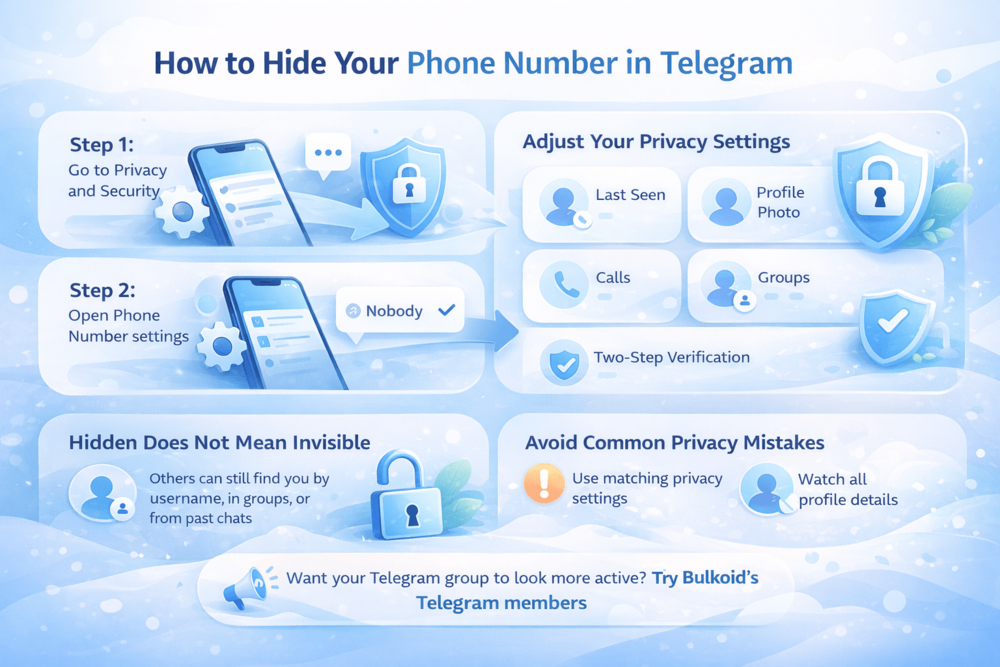
Step 1: Change who can see your number
Open Telegram and go to:
Settings > Privacy and Security > Phone Number
Look for the option called Who can see my phone number.
For the highest level of privacy, choose Nobody.
This helps prevent other users from seeing your phone number when they interact with you on Telegram.
Step 2: Limit who can find you by number
Next, check the option called Who can find me by my number.
This setting controls whether someone who already has your number saved can use it to find your Telegram account.
A more private setup is usually:
- My Contacts for discoverability
- Nobody for visibility
That way, your number stays hidden, and fewer people can use it to locate your profile.
Step 3: Review your exceptions
Telegram may also let you add exceptions to these rules.
For example, you might allow certain people to see your number or block specific users from seeing it, even if your main setting says something else.
Before leaving the menu, it is worth checking whether any exceptions are active. They can sometimes override the privacy setup you think you are using.
A simple privacy setup to use
If your goal is to keep your number as private as possible, this is a good setup:
- Who can see my phone number: Nobody
- Who can find me by my number: My Contacts
Changing these settings is a strong first step, but it works even better when you combine it with a few other privacy options.
Let’s look at the extra Telegram settings worth adjusting if you want more protection.
Best privacy settings for extra protection
Hiding your phone number is a great start, but it only covers one part of your Telegram privacy. If you want your account to feel more locked down, it helps to review a few other settings that affect how visible and reachable you are.
Start with your activity status
One of the first things many people forget about is their last seen and online status. Even if your number is hidden, this setting can still reveal patterns about when you use the app.
A more private option is usually My Contacts or Nobody, depending on how much visibility you want to allow.
Make your profile less visible to strangers
Your profile photo can also give away more than you expect, especially if it is a clear personal image. Limiting who can view it adds another layer of privacy, especially if you interact with people outside your contact list.
Cut down unwanted contact
Telegram also lets you decide who can call you or add you to groups and channels. This is useful if you want to avoid random invites, spammy calls, or contact from people you do not know.
A good rule is to limit both settings to My Contacts unless you have a reason to keep them more open.
Protect the account itself
Privacy settings are important, but account security matters too. Two-step verification adds an extra password to your Telegram account, which makes unauthorized access much harder.
Use your username more, your number less
If you want people to reach you without exposing personal details, your username is the better option. It gives others a way to find or message you without relying on your phone number at all.
That can be especially useful in public groups, hobby communities, or conversations with people you do not know well yet. It also fits naturally with broader questions about whether Telegram is safe to use.
Think of privacy as a combination, not one setting
The biggest mistake is assuming one hidden field makes the whole account private. In reality, Telegram privacy works best when several settings support each other. Your phone number, activity status, profile photo, group permissions, and login protection all play a role.
It also helps to stay familiar with useful Telegram tips and tricks so you can spot risky behavior and make better use of the app’s privacy features.
Hiding your number improves privacy, but it does not make your account disappear, so it is worth understanding exactly what happens after the setting is turned on.
What happens after you hide your number
Once you hide your phone number in Telegram, other users will no longer see it just by opening your profile or messaging you. That gives you more control over your personal information, especially if you chat with people outside your contact list.
Still, hiding your number does not make your account completely invisible.
People can still reach you in other ways
Your account can still be visible through your username, shared groups, forwarded messages, or direct profile links. So while your number becomes private, your presence on Telegram does not disappear.
Your contacts may still be able to find you
If someone already has your number saved and your settings allow discovery by number, they may still be able to locate your Telegram account.
These two settings do different things:
- Who can see my phone number controls visibility
- Who can find me by my number controls discoverability
If you want stronger privacy, both settings matter.
Group activity still reveals parts of your profile
Even with your number hidden, people in the same groups may still see your display name, username, profile photo, and messages inside that chat. If you are active in larger communities, your account can still be noticeable to others.
This becomes even more relevant if you use Telegram to find Telegram groups for any topic or hobby, since joining more communities naturally increases your visibility.
It improves privacy, but not total anonymity
The main benefit is simple: strangers cannot easily view your phone number anymore. That can make Telegram feel much more private.
At the same time, other parts of your profile may still be visible depending on your settings and how you use the app. That is why it also helps to avoid a few common mistakes that can weaken your privacy even after your number is hidden.
Common mistakes to avoid
Hiding your phone number in Telegram helps, but a few small mistakes can still leave more of your account visible than you expect.
Changing only one phone number setting
Many users set Who can see my phone number to Nobody and assume that is enough.
But if Who can find me by my number is still more open, people may still be able to locate your account through your saved number.
Forgetting about exceptions
Telegram lets you add exceptions to privacy rules, which can be useful but also easy to overlook. If an old exception is still active, it may override the main setting you thought you were using.
Leaving other profile details too exposed
Even with your number hidden, your profile photo, last seen status, username, and group activity can still reveal a lot. Privacy works better when you review your account as a whole, not just one setting.
Assuming hidden means anonymous
Hiding your number makes your account more private, but it does not make you invisible. People can still come across your profile in shared groups, through your username, or from past conversations.
Ignoring broader safety habits
Privacy settings help, but they do not stop scams or suspicious messages on their own.
Telegram users still need to watch for fake links, impersonation attempts, and phishing tactics, especially as Telegram phishing scams have become more convincing in recent examples.
Grow your Telegram group more effectively
Privacy settings can help you feel more comfortable using Telegram, but growth matters too if you run your own group or community. Once your account is set up the way you want, the next step is making your space look active, credible, and worth joining.
For people who are trying to build that early momentum, services like Telegram members from Bulkoid can help give a group a stronger starting point. That can be useful when you want your community to look more established while you keep working on content, discussions, and real engagement.
The key is to treat growth support as a boost, not the whole strategy. A group that feels active from the start often has a better chance of attracting real interest over time.
Keep your details private on Telegram

Hiding your phone number in Telegram is one of the easiest ways to get more control over your privacy. It only takes a few taps, but it can make the app feel much safer and more comfortable to use.
Once that setting is in place, it is worth checking the rest of your privacy options too so your account is not giving away more than you expect.
👉 Want your Telegram group to look more active from the start?
Bulkoid can help you buy Telegram members so your community looks fuller, more established, and more inviting to new people.
Explore Bulkoid’s Telegram member services and give your group the momentum it needs.