
How to find Telegram groups is one of the first things new users look for after joining the app. Telegram is home to thousands of communities where people share tips, ideas, and discussions on every topic you can think of, from study help to entertainment.
Groups are what make Telegram social and dynamic. They bring people together, help you learn, and make it easy to stay connected with others who share your interests.
If you’re new to the platform, it helps to understand how Telegram works and what makes it different from other messaging apps. You can read more in our guide on how Telegram works and what it’s used for.
What Are Telegram Groups
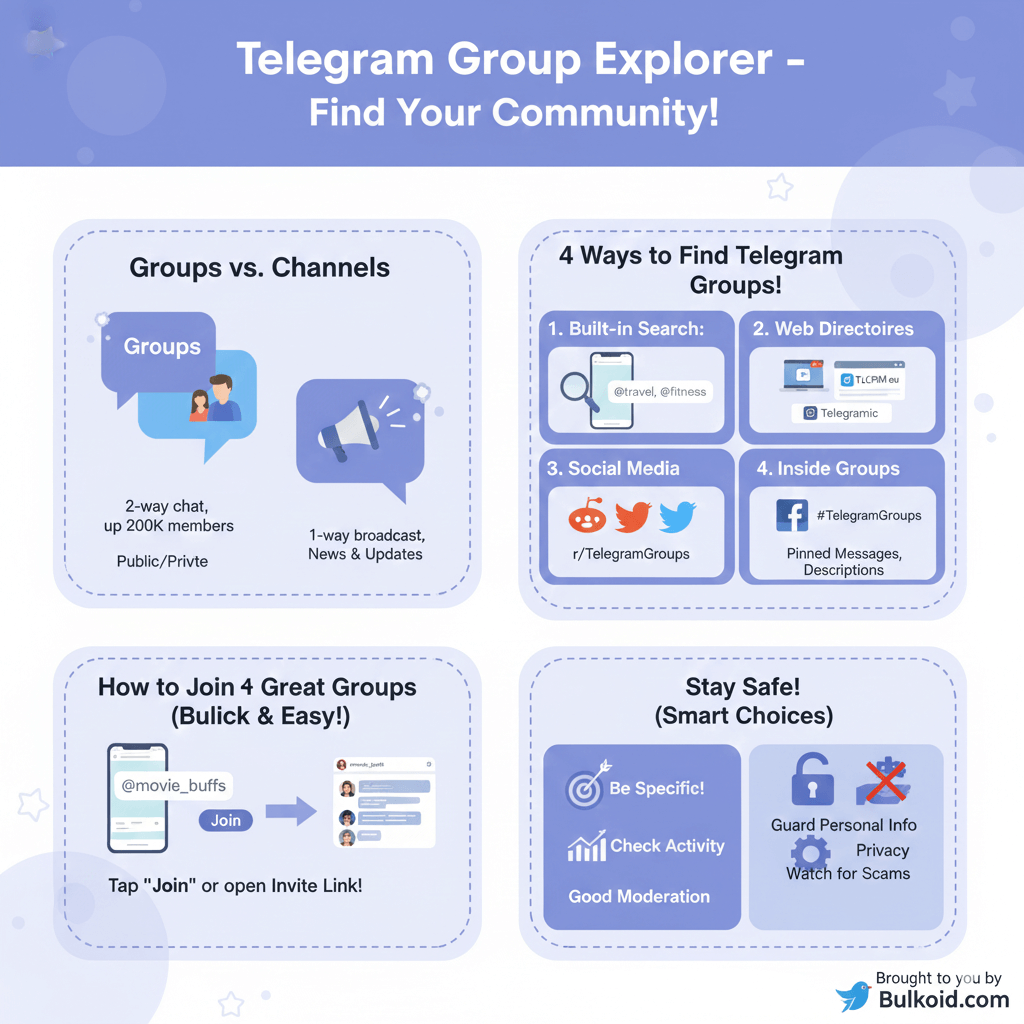
Before learning where to find them, it helps to know what Telegram groups actually are. Telegram lets users create both groups and channels, but the two serve different purposes.
Channels are one-way broadcasts for updates or news, while groups are built for real conversations.
A Telegram group can host up to 200,000 members, making it ideal for everything from small friend circles to large public communities. Groups can be public, meaning anyone can join through a link or search result, or private, where you need an invite from an admin.
This flexibility is what sets Telegram apart from many other messaging platforms, as noted by Forbes
How to Find Telegram Groups

Once you understand what Telegram groups are, the next step is figuring out how to discover them.
There are several reliable ways to find active communities both inside and outside the app.
1. Use Telegram’s Built-In Search
The easiest method is to use Telegram’s search bar. Type a keyword like “travel,” “fitness,” or “tech tips,” and you’ll see a list of public groups with short descriptions and member counts. This helps you decide which ones are worth joining.
If you’re on desktop, scrolling through the results can reveal verified or highly active groups. Telegram’s built-in search has limits, but it’s a quick way to get started.
2. Explore Telegram Group Directories
Several websites organize Telegram groups by topic, making discovery much easier.
These directories are helpful when you want specific communities or larger discussions that might not appear in search.
| Directory | Best For |
| TLGRM.eu | Tech, entertainment, memes |
| Telegramic | Education, study groups, hobbies |
| TelegramChannels.me | News, business, crypto |
| TDirectory.me | Lifestyle, travel, movies |
Each site functions differently but serves the same purpose: to help you find active Telegram groups without relying only on in-app searches.
For background reading, you can look at TechCrunch’s coverage of Telegram’s global growth as a messaging platform.
3. Search on Social Media
Telegram group links are often shared on other social networks. Reddit, Facebook, and X (formerly Twitter) feature dedicated threads or pages that list active group invites.
On Reddit, communities such as r/TelegramGroups frequently post verified lists shared by real users. Facebook groups and hashtags like #TelegramLinks can also lead to topic-specific communities.
Always verify the source before joining to avoid spam or fake links. Reddit’s Help Center has a detailed explanation of how to find and join online communities safely.
4. Look Inside Existing Telegram Communities
Many Telegram groups include links to similar spaces in their pinned messages, group descriptions, or announcements. These cross-links help you discover new discussions related to your interests.
Telegram may also suggest similar groups once you join a new one, helping you grow your network organically.
5. Ask for Recommendations
If you still can’t find what you need, ask trusted friends or contacts to share invite links.
There are also “group exchange” chats where members trade community links in a safe environment.
Once you’ve found a few interesting options, joining them only takes a few taps, as explained in the next section.
How to Join a Telegram Group

Once you’ve found a few groups that interest you, joining them is simple. Telegram makes it easy to connect, whether you have an invite link or find the group through search.
If you’re using Telegram’s built-in search, open the group you want and tap Join. You’ll instantly become part of the conversation. For public groups, that’s all it takes. If the group is private, you’ll need an invite link or admin approval before entering.
Invite links usually look like t.me/groupname. Tapping one opens the group preview, where you can read the description and member count before joining. It’s a small but useful step to confirm that the group fits what you’re looking for.
If you don’t have a Telegram account yet, setting one up only takes a few minutes. You can check our beginner’s guide on how to create a Telegram account for easy step-by-step instructions.
Choosing the Right Groups for Your Interests

With thousands of active communities available, choosing the right Telegram groups can make your experience much more enjoyable.
Instead of joining every group you come across, focus on the ones that truly match your interests and stay active over time.
Use specific keywords when searching. For example, type “language exchange,” “movie discussions,” or “crypto news” instead of broad terms. This helps you find focused groups where members share content regularly.
Before joining, take a quick look at the group’s member count, post frequency, and type of conversations.
Active, well-managed groups usually have pinned messages, clear rules, and genuine discussions rather than spam.
Here are a few categories worth exploring:
- 📚 Learning and Education – study help, language practice, academic tips
- 🎮 Gaming and Esports – team chats, updates, tournaments
- 💼 Business and Freelance – marketing advice, startup discussions, networking
- 🎬 Entertainment and Pop Culture – movies, music, series
- 🌱 Lifestyle and Wellness – fitness, travel, cooking, mindfulness
After joining a few that fit your interests, it’s a good idea to learn how to stay safe while using them.
Safety and Privacy Tips

Joining Telegram groups is a great way to meet new people, but it’s important to protect your privacy while doing so.
Public groups can have thousands of members, so taking a few precautions helps you stay secure and avoid unwanted issues.
Here are a few safety tips to keep in mind:
- Avoid sharing personal information. Never post your phone number, address, or payment details in public chats.
- Review your privacy settings. Hide your phone number and choose who can see your profile picture or online status.
- Watch for scams and fake links. Ignore messages about giveaways or investments that sound too good to be true.
- Join groups with moderation. Look for spaces that have clear rules and active admins.
- Leave unsafe communities quickly. Exit any group that feels suspicious or sends unwanted messages.
Telegram also offers a Security FAQ that explains how to manage privacy and account protection in more detail.
Once you know how to stay safe, you can focus on participating actively or even growing your own group.
Growing or Managing Your Own Group
After spending time in a few Telegram groups, you might decide to create one of your own.
Building a community around shared interests can be rewarding, but growth takes consistency and trust.
Start by inviting people who are genuinely interested in your topic. Keep your group active by posting questions, sharing updates, and encouraging discussions.
Clear rules and regular moderation help maintain a positive atmosphere and attract more members over time.
If you want to give your group an initial boost in visibility, you can grow your member base with real and high-retention users from trusted sources like Bulkoid.
Gradual, authentic growth helps your group appear active, which often leads to more organic participation and long-term engagement.
Once your group gains momentum, focus on keeping members involved and creating content that makes them want to stay.
Finding Telegram Groups: Final Thoughts

Finding Telegram groups that match your interests can completely change how you use the app.
Whether you search directly, explore group directories, or get recommendations from friends, there’s always a community waiting for you.
Stay safe, be active, and focus on groups that add real value to your time online. Meaningful conversations grow in spaces where people share, learn, and connect naturally.
👉 Ready to grow your own Telegram community?
Give your group a gentle visibility boost with real, high-retention Telegram members and start attracting genuine engagement today.