How to delete Telegram account is a question many people have when they want to simplify their digital life or step away from the app. Whether it is about privacy, unused chats, or starting fresh, the choice is completely valid.
Over the years, Telegram has grown fast and gained attention for how it handles content and moderation. This has led some users to rethink their presence on the platform, especially after learning more about why Telegram has raised concerns around harmful content and moderation.
Deleting a Telegram account is permanent, but the process is straightforward once you know the steps. This guide walks you through exactly how to delete your account and what to expect afterward, without unnecessary details or confusing terms.
How to Delete Telegram Account (Step-by-Step Guide)
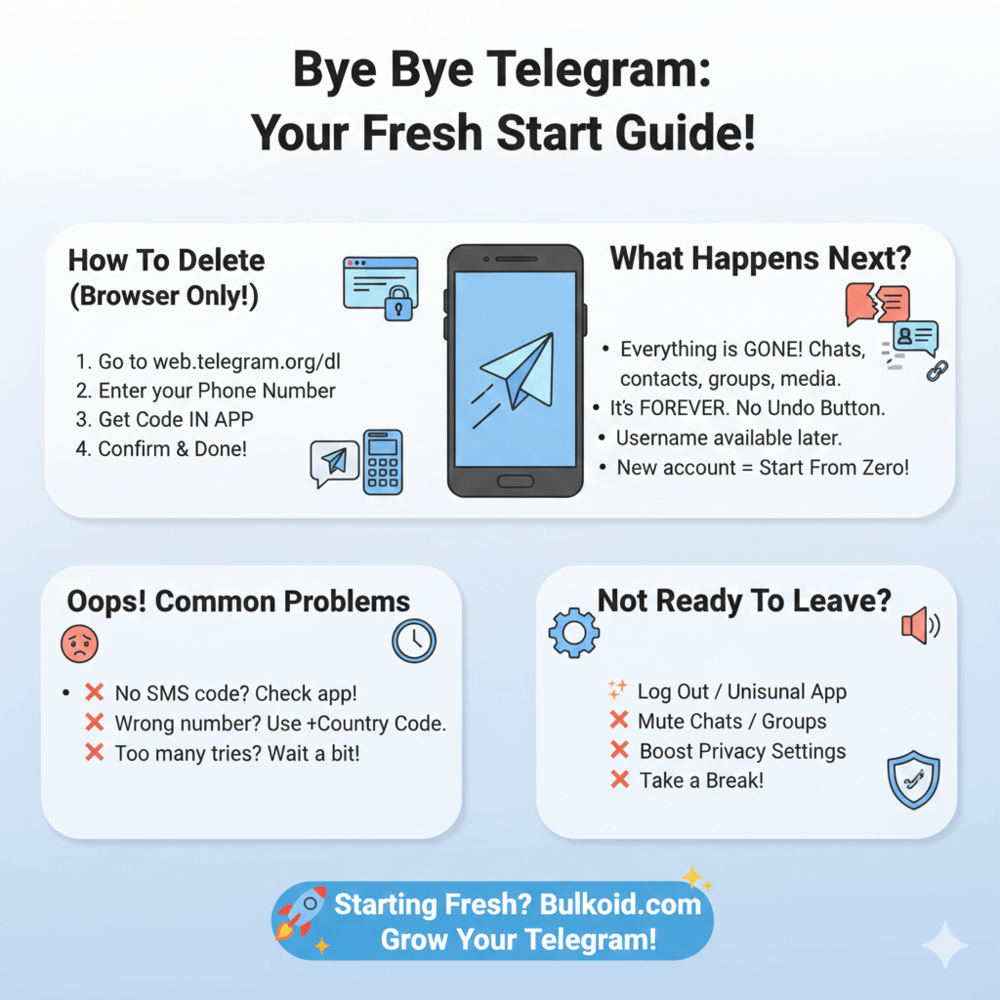
Deleting a Telegram account only takes a few minutes, but you need to do it through a browser, not the app.
Follow these steps in order and you will be done quickly.
Step 1: Open Telegram’s account deletion page
Telegram does not offer an in-app delete option, so you need to use their official deletion page in a browser on your phone or computer.
Step 2: Enter your phone number
Type in the phone number linked to your Telegram account. Make sure to include the correct country code and do not add spaces.
Step 3: Check Telegram for the login code
Telegram will send a login code directly inside the app, not by SMS. This often confuses people, so do not worry if no text message arrives.
Step 4: Enter the code on the website
Copy the code from Telegram and paste it into the deletion page. Once confirmed, you will be logged in.
Step 5: Confirm account deletion
You may see an optional box asking why you are leaving. You can skip this and continue.
Step 6: Accept the final warning
Telegram will show a final message explaining that deletion is permanent. Confirm once more, and your account will be deleted.
After this step, your Telegram account is removed and cannot be restored.
Important Things to Know Before You Delete Telegram
Before deleting your Telegram account, it helps to understand a few key points. These are simple, but important.
- You cannot delete your account from the Telegram app. The process only works through a browser.
- Account deletion is permanent. Once confirmed, there is no undo option.
- All chats, messages, groups, contacts, and shared media are removed.
- You cannot restore your account or recover old data after deletion.
- If you sign up again later, you will be starting with a brand-new account.
Reading through this once can save you from second-guessing later. If everything above sounds fine, you are ready to move on to what happens after your account is deleted.
For users who are mainly concerned about security or privacy, it can also help to understand how safe Telegram is and what users should know before using it before making a final decision.
Why You Can’t Delete a Telegram Account from the App
Many people look for a delete button inside Telegram and assume they are missing something. In reality, the option simply is not there.
Telegram requires account deletion to happen through a browser as an extra security step. This helps prevent someone else from deleting your account if they gain access to your phone for a short time.
It can feel inconvenient, but once you know where to go, the process is still quick. As long as you have access to your Telegram app to receive the login code, deleting your account only takes a few minutes.
What Happens After You Delete Your Telegram Account

Once you delete your Telegram account, the change happens right away.
Here is what you should expect when deleting your Telegram account:
- All personal chats, group messages, contacts, and shared media are permanently removed.
- Other users will no longer see your profile, and private conversations disappear from your side.
- Groups you created may continue to exist, but you will no longer be a member. If there are other admins, the group can still run as usual.
- Your username is not reserved forever and may become available again after some time, even if you decide to sign up later.
Can You Recreate a Telegram Account Later?
Yes, you can create a new account after deleting your old one, but it will be a fresh start. None of your previous chats, contacts, or groups will return.
In some cases, Telegram may limit how often accounts can be deleted and recreated. This is meant to prevent abuse, not to block regular users, but it is still something to keep in mind.
Common Problems When Deleting a Telegram Account (And Fixes)
Most people delete their Telegram account without any issues, but a few small things can slow the process down. If something does not work right away, it is usually easy to fix.
❌ Problem: You did not receive the login code
Fix: The code is sent inside the Telegram app, not by SMS. Open the app and check your messages, even if you are logged in on another device.
❌ Problem: The phone number is not accepted
Fix: Enter the number with the correct country code and remove any spaces or extra characters.
❌ Problem: You tried too many times and got blocked
Fix: Wait a few hours or up to a day before trying again. Temporary blocks are automatic and usually resolve on their own.
❌ Problem: You no longer have access to the Telegram app
Fix: If you cannot receive the login code, you will not be able to delete the account immediately. You may need to regain access or wait until Telegram allows another attempt.
Once these issues are out of the way, the deletion process should work without further problems.
Alternatives to Deleting Telegram Completely

Deleting your Telegram account is not the only option. If you feel overwhelmed or unsure, there are a few lighter steps you can try first.
Some people realize they still like what Telegram offers, just not how they were using it.
In that case, adjusting your approach can help, especially if you better understand [what people actually use Telegram for today].
- Log out of the app instead of deleting your account
- Mute chats or groups that no longer matter to you
- Change your privacy settings to limit who can contact you
- Remove contacts you no longer talk to
These options give you more control without making a permanent decision.
When Taking a Break Makes More Sense Than Deleting
If you mainly want a quieter experience, reshaping how you use Telegram can be enough.
Some users find value in staying connected only to specific communities, especially after learning how to find Telegram groups for topics you care about.
Telegram Growth After Deleting (If You’re Starting Fresh)
Some people delete their Telegram account to step away for good, while others do it to get a clean start and come back with a better experience.
If you plan to return, it helps to know that creating a new Telegram account means everything resets, including members, groups, and visible activity. For personal use, this may not matter much, but for creators, brands, or community owners, starting from zero can feel slow.
That is why some users choose to buy Telegram members when they come back. The idea is not to fake activity, but to avoid an empty-looking group or channel while real people start joining. A small boost can help new visitors feel more comfortable engaging.
This approach works best when it supports real content and interaction. Posting consistently and staying active still matter.
Making the Right Call for You

Deleting your Telegram account is a personal decision, and there is no right or wrong reason to do it. Whether you want more privacy, fewer distractions, or a fresh start, the process is simple once you know the steps.
If you decide to leave for good, you can do so with confidence knowing exactly what happens next. If you plan to come back later, starting fresh gives you the chance to rebuild your experience in a way that works better for you.
Either way, the goal is the same. Use the platforms you choose in a way that feels intentional, manageable, and right for where you are now.