How to see my subscribers on YouTube is a question many creators ask once they start growing their channel. It is useful to know where to find your subscriber list, what YouTube actually shows you, and why some subscribers stay hidden.
The main thing to know is that YouTube lets you see some of your subscribers, but not all of them. If someone keeps their subscriptions private, they will still count toward your total, but their name will not appear in your visible subscriber list.
In this guide, you will learn how to check your subscribers on YouTube, where to find them in YouTube Studio, and what those numbers really mean.
How to See Your Subscribers on YouTube
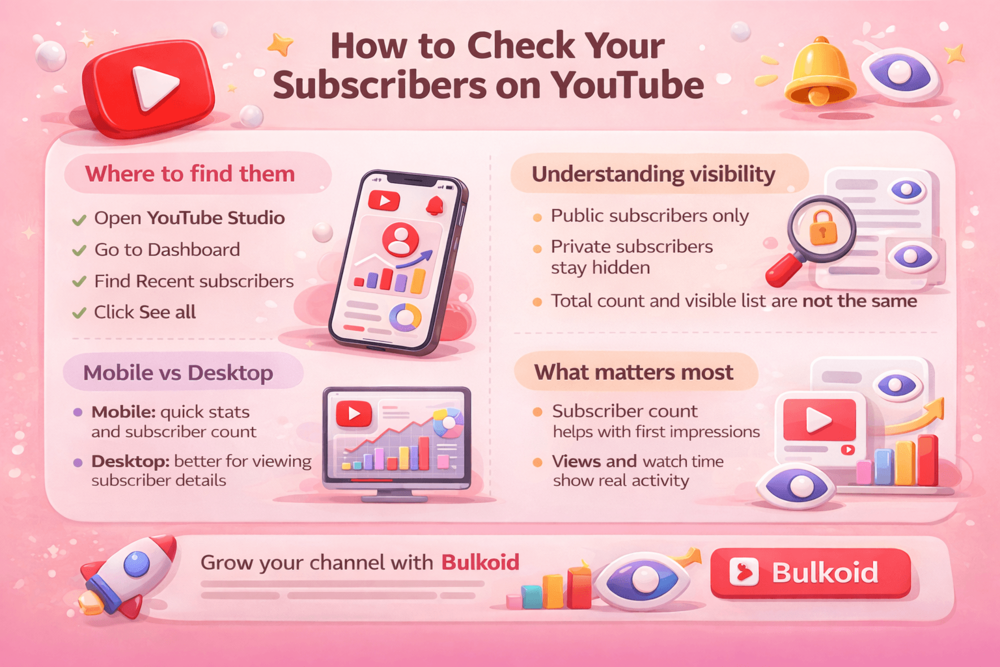
If you want to check who subscribed to your channel, the main place to do it is YouTube Studio. That is where YouTube shows your recent public subscribers and gives you a clearer view of your channel data.
For most creators, desktop is the easiest way to do this. The layout is simpler, the subscriber section is easier to spot, and you can review more details without jumping between screens.
It is also important to understand one thing before you start. The subscriber list you see in YouTube Studio is not your full subscriber base. It only includes people who chose to keep their subscriptions public. Your total subscriber count may be much higher than the list of names you can actually view.
Step-by-Step: How to Check Your Subscriber List
- Sign in to your YouTube account
- Open YouTube Studio
- Go to your dashboard
- Look for the Recent subscribers card
- Click See all to open a larger list
From there, you can view the subscribers YouTube makes visible to you. This usually includes their channel name, when they subscribed, and in some cases extra public channel details.
If you do not see many names there, that does not mean people are not subscribing. In most cases, it simply means many of your subscribers have chosen to keep their subscriptions private.
Can You See YouTube Subscribers on Mobile
Yes, but with more limits.
If you use the YouTube Studio app, you can usually check your total subscriber count and other channel analytics from your phone. That makes mobile useful for keeping an eye on growth when you are away from your computer, especially if you like to compare your progress with the most subscribed YouTube channels or simply track how your own numbers are moving over time.
What mobile does not do as well is give you the same easy view of subscriber details that you get on desktop. If you want to review your recent public subscribers more clearly, desktop is still the better option.
So the simple answer is this:
- Mobile is good for checking subscriber numbers and basic channel stats
- Desktop is better for viewing your visible subscriber list in YouTube Studio
If you only need a quick update, mobile is usually enough. If you want a fuller look at who subscribed and when, it is easier to do that on a computer.
What Information You Can See About Subscribers
When a subscriber is visible in YouTube Studio, YouTube gives you a small amount of public information about that account.
This usually includes:
- the channel name
- the date they subscribed
- their subscriber count, if that information is public
- their public profile or channel details
In other words, you are not getting a full private list of everyone who follows you. You are only seeing the details that a subscriber has chosen to make public and that YouTube makes available in Studio.
For most creators, this is enough to spot patterns. You might notice new subscribers after a certain video, see whether other creators are following your channel, or get a better feel for the type of audience your content is attracting.
Subscriber counts still shape first impressions. Big milestones can become part of a channel’s public identity, as seen with BLACKPINK reaching 100 million YouTube subscribers. It is a reminder that subscriber totals still carry visible credibility, even if they are only one part of channel growth.
Tips for Turning Subscribers Into Active Viewers
Getting a new subscriber is useful, but it matters more when that person keeps watching your content.
A channel can have a decent subscriber count and still struggle with reach. That is why creators need to think beyond the number itself.
Focus on what made people subscribe
If one video brought in new subscribers, look at why it worked.
Was it the topic, the format, or the title? The more clearly you understand that, the easier it becomes to make content your audience actually wants more of.
Keep your posting consistent
You do not need to post every day, but you do need some rhythm.
When viewers subscribe, they expect more content. If your uploads are too random, people may lose interest before they come back.
Give viewers a reason to return
Subscribers are more likely to become active viewers when your content feels connected.
That can mean:
- continuing a topic
- turning one idea into a series
- following up on a popular video
- keeping a consistent style or niche
Pay attention to views, not just subscribers
A subscriber count looks good on the channel page, but views tell you whether people are actually showing up.
That is why many creators spend just as much time on getting more YouTube views with a small channel as they do on gaining subscribers in the first place.
Watch the bigger strategy
The most useful subscriber data is not just who followed you. It is what happened next.
Did they watch again? Did they click your next upload? Did they stay on the video?
That is also why current conversations around video strategy for YouTube in 2026 focus so much on retention, consistency, and viewer behavior instead of subscriber count alone.
Conclusion
You can see some of your subscribers on YouTube, but not all of them.
YouTube Studio shows your recent public subscribers, while private subscribers still count toward your total without appearing in the list. That is why the visible names and your full subscriber number often do not match.
The main takeaway is simple: checking subscribers is helpful, but the number means more when it is backed by real views, watch time, and returning viewers.
👉 Want to grow your channel faster?
Building a YouTube channel takes time, but a stronger subscriber count can help your profile look more established from the start.
If you want to give your channel a boost while you keep working on content, buy YouTube subscribers can be one way to strengthen your social proof and make a better first impression on new visitors.