How to make an album on SoundCloud is an essential skill for any new artist looking to share their music in a more professional way.
SoundCloud makes it easy to group songs into one complete project so listeners can enjoy your tracks in the right order.
Albums help your music feel more cohesive and memorable. They give fans a reason to listen from start to finish and let you present your work as a story rather than random uploads.
Learning how to set up an album correctly also helps with visibility, making your profile look more polished and inviting.
Prepare Before Creating Your Album

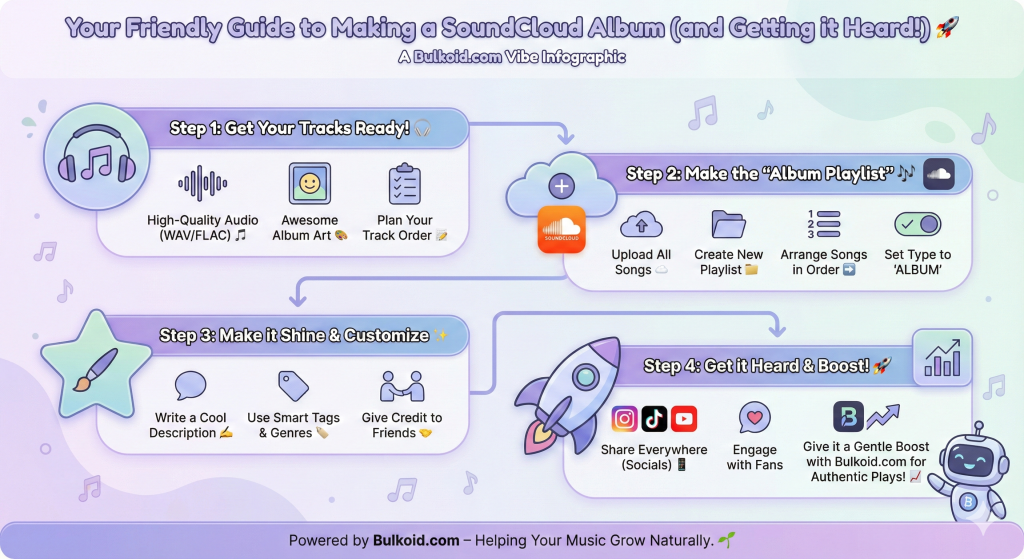
Before you start learning how to make an album on SoundCloud, make sure you have everything ready.
A little preparation helps your release look clean and professional.
Here’s what you’ll need:
A complete SoundCloud profile – Add a clear photo, banner, and bio that represent your artist identity.
High-quality audio files – Use WAV or FLAC for best sound. Upload tracks privately first so you can fine-tune details later.
Consistent artwork – Your album cover should match your music’s tone. Free tools like Canva’s album cover maker or Adobe Express templates work well.
Accurate metadata – Check every track’s title, genre, and description before grouping them.
A clear track order – Decide how songs should flow to tell your story or fit your theme.
Once these basics are in place, you’re ready to organize your songs and publish your album.
Step-by-Step: How to Make an Album on SoundCloud

Creating an album on SoundCloud is simple once your tracks are ready.
SoundCloud treats albums as playlists, so you’ll be grouping songs together under one name and marking the playlist as an album.
Here’s how to do it:
- Upload or select your tracks – Make sure all the songs you want in your album are uploaded to your account. You can use public or private tracks.
- Create a new playlist – Go to one of your uploaded songs, click “Add to playlist,” then choose “Create a new playlist.”
- Add your remaining tracks – Include all songs you want in your album, arranging them in the right order.
- Edit playlist details – Add a title, description, genre, and tags. Keep them consistent with your artist style.
- Change playlist type to Album – Under “Playlist type,” select “Album.” This tells SoundCloud to treat it as a full project, not just a playlist.
- Upload your cover art – Use your chosen artwork to make the album look cohesive.
- Adjust privacy and release options – Choose whether you want the album to be public, private, or scheduled for release on a specific date.
- Save and publish – Review everything once more, then hit “Save.” Your album will now appear under your SoundCloud profile as a complete release.
Once your album is live, presentation becomes just as important as the music itself.
Small details like visuals, descriptions, and tags help your project stand out and feel more polished.
Customize Your Album Like a Pro

Once your album is uploaded, focus on how it looks and feels. Customizing it properly helps your project appear more professional and keeps listeners engaged from the first click.
🎧 Write a strong album description
Use this space to share your story, the theme behind your songs, or the mood you want listeners to feel.
A clear and engaging description helps new fans connect with your music.
🎨 Use consistent visuals
Choose an album cover that reflects your sound and personality. Tools like Canva or Adobe
Express make it easy to design something clean and unique without hiring a designer.
🎵 Keep your track order intentional
The sequence should guide listeners through your project naturally, whether you’re telling a story or building a specific vibe.
🔖 Add tags and genres wisely
Use accurate tags and include your main genre so your album reaches the right audience through SoundCloud’s recommendations.
🤝 Include credits or links
If you collaborated with producers, vocalists, or visual artists, mention them. Giving credit adds authenticity and professionalism.
If you’re using SoundCloud’s free plan, you might notice short ads before some tracks. Understanding how SoundCloud’s ad system works can help you decide if upgrading is worth it, especially if you want listeners to experience your album without interruptions.
Once your album looks and sounds exactly how you want, the next step is getting it heard by more people.
Optimize and Promote Your SoundCloud Album

Now that your album is complete, it’s time to help it reach the right audience.
SoundCloud’s discovery system relies on good metadata, engagement, and consistency, all of which you can improve with a few smart moves.
Use detailed tags and genres – Add specific subgenres, moods, and themes. This helps SoundCloud recommend your album to people who already enjoy similar music.
Repost strategically – Share your album on your profile and collaborate with friends or creators who can repost it to their followers.
Share your album across platforms – Post snippets on Instagram, short teasers on TikTok, and behind-the-scenes clips on Instagram. Using trending TikTok sounds can make your clips more visible and attract curious new listeners.
Engage with your audience – Reply to comments and thank listeners who share your tracks. A little interaction goes a long way in building loyalty.
Promote smartly – Share your album in online music communities, indie forums, or creative spaces where people appreciate new projects. Sites like Reddit’s music discussions or Medium’s independent artist blogs can help your work travel further.
Good promotion goes beyond posting links. It’s about building genuine interest and giving people a reason to listen.
Once you start getting steady plays, you can strengthen that growth even more with organic activity from real listeners.
Boosting Your Album’s Reach Organically

Once your album starts gaining some traction, the next step is to keep that momentum going. Real engagement helps SoundCloud’s algorithm notice your tracks and recommend them to new listeners.
🎯 Focus on organic plays – Authentic plays from real listeners show SoundCloud that people enjoy your music. This builds credibility and keeps your growth stable over time.
🌱 Encourage genuine interaction – Ask fans to comment on their favourite track, share your album in stories, or add songs to their playlists. Every bit of activity helps boost visibility.
🔊 Use real SoundCloud plays wisely – Many independent artists give their album an early push by using high-retention plays from trusted providers like Bulkoid.
When done carefully, it helps the algorithm recognise your songs and surface them to more potential fans without relying on artificial spikes.
🕓 Stay consistent – Keep releasing new tracks or small projects to maintain attention. Regular uploads show that you’re active, which helps your profile stay visible.
Organic growth takes time, but it’s what builds a loyal fan base.
Once your album gains steady engagement, it becomes much easier for new listeners to discover your music naturally.
Final Thoughts
Learning how to make an album on SoundCloud helps you share your music in a more polished and professional way.
A well-organized album shows your growth as an artist and keeps listeners coming back for more.
Consistency, quality, and presentation matter just as much as the songs themselves. Keep refining your sound, post regularly, and engage with your audience to build a loyal following.
👉 Want your album to reach more listeners?
Give it a gentle boost with real SoundCloud plays and followers from Bulkoid.
Authentic engagement helps your music get noticed and grow naturally.