
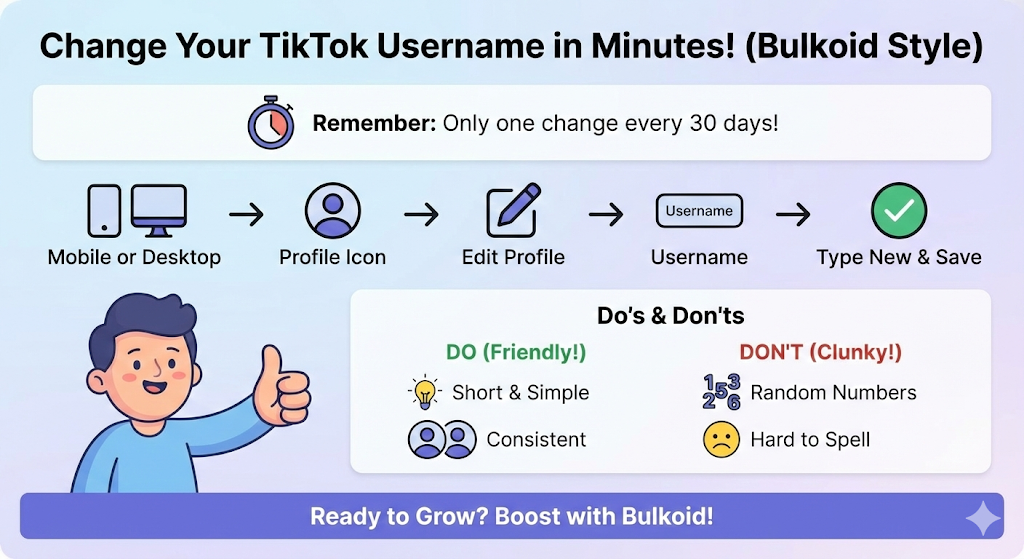
Changing your TikTok username is one of the easiest ways to refresh your profile or align it with your current style. Whether you’re rebranding, switching to a more memorable handle, or simply correcting an old choice, the process takes less than a minute.
Your username also appears in your profile link, so choosing one that’s clear and easy to share helps people find you faster. Before you update it, there are a few rules to keep in mind, including TikTok’s 30-day limit and the requirement that every username is unique.
Before You Change Your TikTok Username

Changing your username is simple, but a few rules help you avoid problems afterward. TikTok only allows one change every 30 days, so it’s important to choose a handle you are confident about.
Your username becomes part of your profile link. If you share your TikTok on Instagram, YouTube or your website, you will need to update those links once the new handle is active.
TikTok also has naming guidelines to keep profiles clean and easy to identify. Avoid special characters that the platform does not support and choose something people can type without confusion.
Below is a quick checklist to help you prepare.
Do:
• Keep it simple and easy to remember
• Match your name across other social platforms
• Choose something short and searchable
Don’t:
• Add random numbers that make your handle hard to find
• Use symbols TikTok does not allow
• Expect to change it again within 30 days
When you know the rules, updating your username becomes a smooth process. Let’s move to the step-by-step guide.
How to Change Your TikTok Username on Mobile
Most people update their username through the TikTok app. The steps are quick and take less than a minute once you know where everything is.
1. Open the TikTok app: Make sure you are logged in to the account you want to update.
2. Go to your profile: Tap the Profile icon in the bottom right corner.
3. Tap “Edit profile”: This takes you to all your editable profile details.
4. Select “Username”: You will see your current handle and a field where you can type a new one.
5. Enter your new username: TikTok will automatically check availability. If the name is already taken, try a shorter version or a small variation that still fits your brand.
6. Save your changes: If the name is available and you have not changed it in the last 30 days, TikTok will confirm the update.
If your new username doesn’t appear instantly, it is usually a refresh issue. Clearing your TikTok cache later in the post can help the app reload your profile correctly.
Once the mobile steps are done, the new handle becomes active across your account. Next, let’s look at how to change it on desktop.
How to Change Your TikTok Username on Desktop
You can also update your username from a computer. The layout is slightly different, but the steps are just as simple.
1. Go to tiktok.com: Log in to your account.
2. Open your profile: Click your profile picture in the top right corner and select View profile.
3. Select “Edit profile”: This opens all your editable details.
4. Choose “Username”: Type the new handle you want to use.
5. Save your changes: If the username is available and you are not within the 30-day limit, TikTok will confirm the update.
Most users prefer changing their username on mobile, but the desktop option works well if you are already editing other parts of your profile from your computer.
Next, let’s go over how to choose a strong username that helps your account grow.
Tips for Choosing a Strong TikTok Username

A good username helps people remember you and makes your profile easier to find.
It also sets the tone for your content, so choosing something clear and consistent supports your long-term growth.
To make the process easier, here are a few practical ideas to guide you:
What Makes a Good TikTok Username
• Short, clean and easy to spell
• Memorable and easy to say out loud
• Consistent with your name on other platforms
• Relevant to your niche or content style
• Simple enough for people to type without mistakes
What to Avoid
• Random numbers that make your handle look confusing
• Extra symbols TikTok doesn’t support
• Long usernames that are hard to remember
• Words that are difficult to spell
• Handles that don’t match your content or brand
A new username also works best when your profile feels cohesive. After updating it, refreshing your bio helps visitors understand your style and direction more clearly.
Now let’s look at common issues you might face when changing your username and how to fix them.
Common Problems and How to Fix Them

Most username changes happen smoothly, but a few issues can appear depending on availability, timing or app settings. Here are the problems you’re most likely to see and how to solve them fast.
Username isn’t available
TikTok requires every username to be unique. If your handle is taken, try shorter variations, remove special characters or use a clean keyword that still fits your style.
You can’t change your username right now
This usually means the 30-day limit is active. TikTok only allows one change every 30 days, so you will need to wait until the timer resets.
Your username violates TikTok rules
Certain symbols and formatting aren’t allowed. Stick to letters, numbers and simple punctuation to avoid errors.
The new username doesn’t show up
Sometimes the app displays your old handle for a while. This is normally a refresh issue. Clearing your TikTok cache forces the app to reload your profile details and helps the new username appear correctly.
Your link doesn’t update
Your profile URL changes the moment you update your username, but some apps may still show the old link due to caching. Updating your link everywhere you share your TikTok prevents broken redirects.
Final Thoughts

Changing your TikTok username is a simple way to refresh your profile and make your account easier to find.
After you update it, give your bio and profile details a quick check so everything feels clean and consistent. Small tweaks like this help new visitors understand your content faster.
A new handle won’t affect your videos or followers, so you can rebrand without losing progress. Keep posting, stay active and let the algorithm pick up your updated identity.
👉Ready to grow faster after your username change?
Boost your reach with real, high-retention TikTok followers and give your content the visibility it deserves.